

Logitech G403 HERO – Ergonomic wired gaming mouse with HERO 25K sensor and ultra-precise 25,600 DPI tracking.Delivers pro-grade performance with customizable RGB, 6 buttons, and optional weight tuning. ✅ Full Specifications: Model: Logitech G403 HERO Sensor: HERO 25K Optical Sensor DPI: 100 – 25,600 DPI (adjustable with no smoothing, acceleration, or filtering) Polling Rate: 1000 Hz (1ms response time) Tracking Speed: >400 IPS Acceleration: >40G Buttons: 6 programmable buttons (including 2 side buttons) Switches: Mechanical with metal spring button tensioning (rated for 20M+ clicks) Lighting: RGB Lighting (logo and scroll wheel, customizable via G HUB) Weight: Approx. 87g (mouse only) + 10g optional weight Grip Style: Palm and claw grip support Cable: 2.1 meters (standard rubber cable) Build: Ergonomic right-handed design with rubber side grips Software: Logitech G HUB (for DPI, lighting, macros, and profiles) Compatibility: Windows 7 or later, macOS 10.11 or later, Chrome OS Onboard Memory: Yes (save DPI and button settings directly to the mouse)

The Apple Magic Mouse (USB-C version) is a sleek, minimalist multi-touch wireless mouse built for Mac users. It offers smooth gesture support, Bluetooth connectivity and a built-in rechargeable battery — a great choice if you prefer a clean desk setup and full compatibility with macOS and iPadOS. General Name: Magic Mouse (USB-C) — part of Apple’s pointing-device lineup. Wireless connectivity: Bluetooth. Rechargeable battery: built-in, no disposable AA cells. Charging / port: USB-C port (bottom of mouse) for pairing and charging. Compatibility: Requires a Mac with macOS 15.1 or later, or an iPad with iPadOS 18.1 or later. Size & Weight Height: ~0.85 inch (2.16 cm) Width: ~2.25 inch (5.71 cm) Depth: ~4.47 inch (11.35 cm) Weight: ~0.22 pound (0.099 kg) (varies slightly by manufacturing) Features Multi-Touch surface: supports gestures such as swiping between pages, scrolling through documents, zooming. Glide / foot design: optimized for smooth movement across desktop surfaces. Rechargeable battery life: about a month or more between charges (typical use) per Apple spec. Used Condition ConsiderationsSince you’re specifying a used unit: Check for wear on the bottom feet / skates — these degrade and affect glide. Verify battery capacity / health (rechargeable batteries age). Confirm the port is functioning (USB-C) and Bluetooth connectivity is stable. Look for signs of excessive surface scratches on the multi-touch top — may impair gestures. Ensure the firmware / Mac recognizes it fully (gestures working). Upgradability / Limitations Not user-upgradable: You cannot replace the internal battery or change internals easily. Design limitation: The USB-C port remains on the bottom of the mouse, meaning you cannot use it while charging unless you flip it. This design is still criticized. Ergonomics: The flat, low-profile design is stylish but may not suit extended-use comfort for some users.

HyperX Pulsefire Core (4P4F8AA) – RGB gaming mouse with PixArt sensor, 6,200 DPI, and 7 programmable buttons.Lightweight, ergonomic design perfect for gamers seeking precision and durability. Model: HyperX Pulsefire Core (4P4F8AA) Sensor Type: PixArt PAW3327 Optical Sensor DPI Range: 800 – 6,200 DPI (adjustable in software) Polling Rate: 1000 Hz Tracking Speed: Up to 220 IPS Acceleration: 30G Buttons: 7 programmable buttons Switch Type: Durable switches rated for up to 20 million clicks Lighting: Customizable RGB lighting (logo zone) Grip Style: Palm or claw grip Design: Ergonomic, right-handed shape with textured side grips Weight: Approx. 87g (without cable) Cable Length: 1.8 meters (braided USB cable) Software Support: HyperX NGENUITY for DPI, RGB, and button customization Compatibility: Windows 10, 8.1, 8, 7

WiWU Infinite USB‑C to HDMI Adapter (HB004) – Sleek aluminum dongle offering 4K@60Hz output over USB‑C (DP Alt‑Mode), plug-and-play with no drivers needed.Compact, portable, and reliable—a must-have for mobile productivity, gaming, and media streaming. Model: WiWU Infinite USB‑C to HDMI Adapter (HB004) Video Output: HDMI 2.0, supports up to 4K @ 60 Hz resolution Material & Weight: Robust aluminum alloy body, compact, weighs ~69 g Compatibility: Plug-and-play connector works with USB‑C devices supporting DP Alt‑Mode—compatible with laptops, smartphones, tablets, consoles Design & Build: Slim, portable, durable—no driver/software required Use Cases: Ideal for mirroring/extending screens for presentations, streaming, gaming

MacBook Air 13″ Retina A1932(2018-2019-2020) Display Assembly (Silver) MacBook Air 13″ Retina Display 2019 A1932 (EMC 3184 MacBookAir8,2) 1.6 GHz MacBook Air 13″ Retina Display 2020 A2179 (EMC 3302 MacBookAir9,1) 1.1 GHz Core i3 A2179 (EMC 3302 MacBookAir9,1) 1.1 GHz Core i5 A2179 (EMC 3302 MacBookAir9,1) 1.2 GHz Core i7 MacBook Air 13” Retina Display Late 2018 A1932 (EMC 3184 MacBookAir8,1) 1.6 GHz

REMAX RT-E601 1200MAH TIME II SERIES EYE-CARING LED LAMP Function— Use the power key to turn on/ off the lamp. Tap the power key to adjust the brightness of the lamp (brightest-normal-dimmest-off) four steps are easy to use. When folding the design lamp holder and arm can rotate the angle within a range of 180 degrees up-down adjustment. Press and hold “Mode” Set” Up” Donkey enter normal time mode, alarm clock and snooze mode, birthday reminder mode timer mode, and temperature mode. Time changes 12 hours/24 hours mode and adjusting the hours, minutes, year, month,t,h, and day. Temperature can change to Celsius or Fahrenheit. The red light will be on when it starts charging, and the red light will go out when it is fully charged. Material—ABS+PC Rated voltage—DC5V /0.5A lighting Mode—Direct glow Key Type—Touch key Luminous flux—250m Color rendering index—>80 Rated power—4W Battery Capacity—1200mAh Weight—346g Charging port—Micro SIZE—87*87*263mmCharging time—4-4:30hour Working time—3:30hour

WiWU Durable USB C to Type C PD 60W Fast Charging Cable for Mobile Phone Laptop Tablet

Genuine-spec touchpad flex cable compatible with both MacBook Air A2179 (Intel, 2020) and A2337 (M1, 2020)—restores full Force Touch functionality, haptic feedback, and precise multi-touch gesture control during trackpad repair or replacement. Compatible With: MacBook Air 13″ (2020, Intel) – Model A2179 (Model Identifier: MacBookAir9,1) MacBook Air 13″ (2020, Apple M1) – Model A2337 (Model Identifier: MacBookAir10,1) MacBook Air 13″ (2020, Intel) – Model A2179 (Model Identifier: MacBookAir9,1) MacBook Air 13″ (2020, Apple M1) – Model A2337 (Model Identifier: MacBookAir10,1) ✅ Important Note: Despite different processors (Intel vs. M1), Apple used the same trackpad assembly and flex cable in both A2179 and A2337. This makes the flex cable fully interchangeable between the two models. Part Type: Touchpad flex cable only — does not include the trackpad housing, Taptic Engine, or mounting hardware. This is the OEM-style ribbon cable that connects the trackpad to the logic board. Function: Transmits: Touch input coordinates Force Touch pressure data Haptic feedback signals to the Taptic Engine Enables full macOS gesture support: Force Click, three-finger lookup, swipe navigation, pinch-to-zoom, and smooth cursor tracking. Touch input coordinates Force Touch pressure data Haptic feedback signals to the Taptic Engine Enables full macOS gesture support: Force Click, three-finger lookup, swipe navigation, pinch-to-zoom, and smooth cursor tracking. OEM-Quality Build: Matches Apple’s original specifications in: Cable length and routing path Connector pitch and ZIF latch design EMI shielding and flex durability Cable length and routing path Connector pitch and ZIF latch design EMI shielding and flex durability Common Use Cases: Replacing a torn, creased, or liquid-damaged original flex cable Completing a trackpad replacement when the original cable is compromised Fixing intermittent trackpad behavior, loss of Force Touch, or complete unresponsiveness Replacing a torn, creased, or liquid-damaged original flex cable Completing a trackpad replacement when the original cable is compromised Fixing intermittent trackpad behavior, loss of Force Touch, or complete unresponsiveness Installation Note: Requires full bottom case removal and battery disconnection. Cable routes under the right side of the battery and logic board. Connects via a ZIF (Zero Insertion Force) socket—align carefully and latch gently. Recommended for experienced or certified technicians only. Requires full bottom case removal and battery disconnection. Cable routes under the right side of the battery and logic board. Connects via a ZIF (Zero Insertion Force) socket—align carefully and latch gently. Recommended for experienced or certified technicians only.

Remax F27 Fonzyr Desktop Fan – 5 W rechargeable fan with 360° adjustable airflow and multi-installation options.Compact (187×206 mm), lightweight, with fast Type-C charging (~2 h) and built-in 1,200 mAh battery. Model: Remax F27 Fonzyr Series Circulation Desktop Fan Power: 5 W, operates on 5 V/1 A power supply Rotation: 360° adjustable airflow for full-range ventilation Battery: Built-in 1,200 mAh rechargeable battery; Type-C charging, ~2 hours charging time Dimensions & Build: Approx. 187 × 206 mm, lightweight ABS plastic housing (~697 g) Installation: Designed for desktop use, wall mounting, or hanging—ideal for multi-location placement

Replacement cable for MacBook Pro A2794, designed to restore proper connection and functionality for damaged or faulty internal cables. Ideal for technicians and repair shops, ensuring reliable performance and correct fit for A2794 models. Type: USB-C to USB-C charging/data cable Model: A2794 Length: 2 meters (≈ 6.6 ft) Color: White Design: Woven braided cable for durability Connectors: USB-C (Male) on both ends Power Delivery: Supports up to 240 W high-power charging when used with a compatible USB-C PD adapter Data Transfer: USB 2.0 transfer speeds Designed for fast charging and syncing between USB-C devices

Genuine-spec touchpad flex cable for MacBook Pro 15″ (Model A1706 – 2017 and A1989 – 2018/2019)—restores full Force Touch functionality, haptic feedback, and precise multi-touch gesture control during trackpad repair or replacement. Compatible With: MacBook Pro 15″ (2017) – Model A1706 (Model Identifier: MacBookPro14,3) MacBook Pro 15″ (2018–2019) – Model A1989 (Model Identifier: MacBookPro15,2) ✅ Note: Apple used the same trackpad assembly and flex cable across both A1706 and A1989 15″ models—making this part interchangeable between them. MacBook Pro 15″ (2017) – Model A1706 (Model Identifier: MacBookPro14,3) MacBook Pro 15″ (2018–2019) – Model A1989 (Model Identifier: MacBookPro15,2) ✅ Note: Apple used the same trackpad assembly and flex cable across both A1706 and A1989 15″ models—making this part interchangeable between them. ✅ Note: Apple used the same trackpad assembly and flex cable across both A1706 and A1989 15″ models—making this part interchangeable between them. Part Type: Touchpad flex cable only — does not include the trackpad housing, Taptic Engine, or mounting hardware. This is the OEM-style ribbon cable connecting the trackpad to the logic board. Function: Transmits: Touch input coordinates Force Touch pressure data Haptic feedback signals to the Taptic Engine Enables full macOS gesture support: Force Click, three-finger lookup, swipe navigation, pinch-to-zoom, and smooth cursor tracking. Touch input coordinates Force Touch pressure data Haptic feedback signals to the Taptic Engine Enables full macOS gesture support: Force Click, three-finger lookup, swipe navigation, pinch-to-zoom, and smooth cursor tracking. OEM-Quality Build: Matches Apple’s original in: Cable length and routing Connector pitch and ZIF latch design EMI shielding and flex durability Cable length and routing Connector pitch and ZIF latch design EMI shielding and flex durability Common Use Cases: Replacing a torn, creased, or liquid-damaged original flex cable Completing a trackpad replacement when the original cable is compromised Fixing intermittent trackpad behavior, loss of Force Touch, or complete unresponsiveness Replacing a torn, creased, or liquid-damaged original flex cable Completing a trackpad replacement when the original cable is compromised Fixing intermittent trackpad behavior, loss of Force Touch, or complete unresponsiveness Installation Note: Requires full bottom case removal and battery disconnection. Cable routes under internal components near the right speaker and logic board. Connects via a ZIF (Zero Insertion Force) socket—must be aligned carefully and latched gently. Recommended for experienced or certified technicians only. Requires full bottom case removal and battery disconnection. Cable routes under internal components near the right speaker and logic board. Connects via a ZIF (Zero Insertion Force) socket—must be aligned carefully and latched gently. Recommended for experienced or certified technicians only.

Genuine-quality replacement A1989 battery testing flex cable—brand new and ready for professional MacBook Pro 15" (2018–2019) battery diagnostics and repairs. Genuine-quality replacement A1989 battery testing flex cable—brand new and ready for professional MacBook Pro 15″ (2018–2019) battery diagnostics and repairs. This is a brand-new A1989 Battery Testing Flex Cable, designed specifically for use in MacBook Pro 15-inch models from 2018 and 2019 (A1989) during battery replacement or diagnostic procedures. The flex cable connects the battery to the logic board’s test points, allowing technicians to verify battery health, voltage, and communication before final reassembly—ensuring safe and accurate repairs. Made with high-quality materials and precise engineering, this flex cable matches OEM specifications for fit, function, and reliability. It’s an essential tool for certified repair shops, independent technicians, and advanced DIYers performing battery servicing on T2-chip MacBook Pro models. Please note: This is not a full battery—it is the small flex cable used during battery testing and installation. Proper handling and ESD-safe practices are recommended during installation. Compatible with: MacBook Pro 15″ (2018, A1989) MacBook Pro 15″ (2019, A1989)
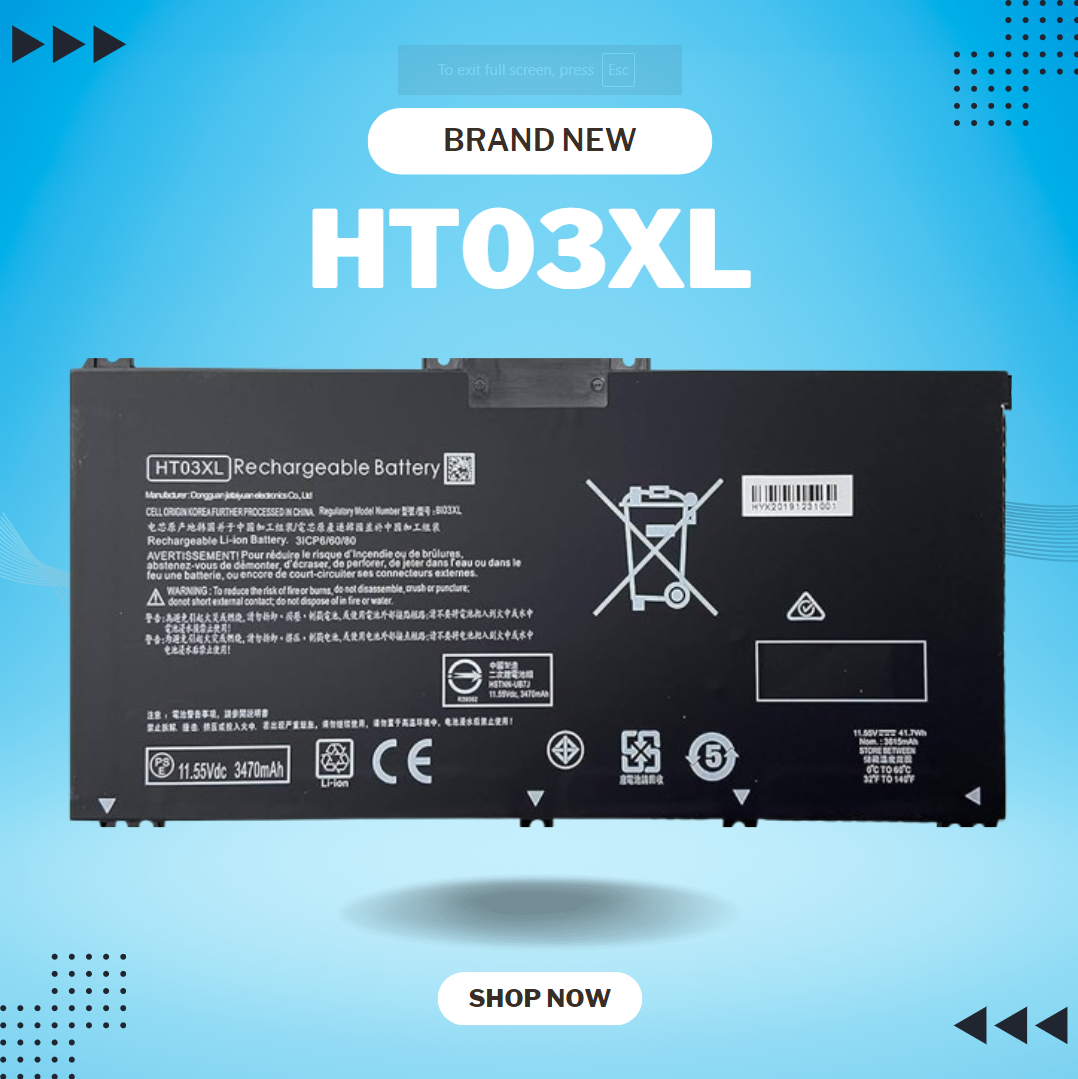
HT03XL L11119-855 Laptop Battery for HP Pavilion 14-CE 14-CF 14-DF 15-CS 15-DA 15-DB 15-DW 17-by 17-CA Series 15-CS0053CL 15-DW0033NR 15-DA0014DX L11421-542 L11421-2C2 HSTNN-UB7J HSTNN-DB8R HT03041XL About this item Compatible with: HP HT03XL Battery, for HP Pavilion 14-CE 14-CF 14-CK 14-cm 14-DF 14-MA 14Q-CS 14Q-CY 14S-CF 14S-CR 15-CS 15-CW 15-DA 15-DB 15G-DR 15T-DA 15T-DB 17-by 17-CA Series 14-CE0000 14-CE0020TX 14-CE0025TX 14-CE0027TU 14-CE0028TX 14-CE0029TX 14-CE0030TX 14-CE0034TX 14-CE1058WM 14-CE0068ST 14-CE1056WM 14-CE0064ST 14-CE0006DX 14-CF0000 14-CF0014DX 14-CF1015CL 14-CM0000 14-CM0020NR 14-CM0012NR 14Q-CS0000 14Q-CS0006TU 15-CR0000 15-CR0087CL 15-CR0052OD 15-CR0055OD 15-CR0037WM 15-CR0051CL 15-CR0091MS 15-CR0010NR Replacement Battery for HP Pavilion 15-CS0000 15-CS2010NR 15-CS025CL 15-CS2073CL 15-CS2079NR 15-CS1063CL 15-CS0072WM 15-CS0051WM 15-CS1065CL 15-CW0000 15-CW1063WM 15-DA0000 15-DA0066CL 15-DA0002DX 15-DA0079NR 15-DA1005DX 15-DA0032WM 15-DA0033WM 15-DA0073MS 15-DA0012DX 15-DA0071MS 15-DA0086OD 15-DB0000 15-DB0015DX 15-DB0031NR 15-DB0011DX 15-DB0066WM 15-DB0005DX 15-DB0048NR 15-DB0051OD 15-DB0048CA 17-BY0000 17-BY1053DX 17-BY1033DX 17-BY0060NR 17-BY0021DX 17-BY0053CL 17-BY0021CY 17-BY1055CL Laptop Compatible for HP Pavilion 240 G7, 245 G7, 250 G7, 255 G7, 340 G5, 348 G5 Series;P/N: HSTNN-DB8R HSTNN-DB8S HSTNN-IB80 HSTNN-IB8O HSTNN-LB8L HSTNN-LB8M HSTNN-UB7J HT03041XL HTO3XL HT03XL L11119-855 L11421-1C1 L11421-1C2 L11421-2C1 L11421-2C2 L11421 -2C3 L11421-2D1 L11421-2D2 L11421-421 L11421-422 L11421-423 L11421-542 L11421-544 L11421-545 TPN-C136 TPN-I130 TPN-I131 TPN-I132 TPN-I133 TPN-I134 TPN-Q207 TPN-Q208 TPN-Q209 TPN-Q210 Specifications: ht03xl battery for hp, Battery Type: Li-ion Voltage: 11.55V Capacity: 41.7WH 3470mAh;Cells: 3-cell; Color: Black Packages includes: l11119-855 hp battery, with Two Free Screwdrivers; HTO3XL Battery for hp model 15-cs0085cl 15-cs0073cl 15-cs3075cl 15-cs3073c 15t-cs300 15t-cs200 15-da0021cy 15-da0011la 15t-db000 14-cf0013dx 14-cf0051od 15-ef0023dx Compatible devices: HP HT03XL Rechargeable li-ion Battery, for HP Pavilion 14-CE 14-CF 14-CK 14-cm 14-DF 14-DH 14-MA 14Q-CS 14Q-CY 14S-CF 14S-CR 15-CS 15-CW 15-DA 15-DB 15G-DR 15T-DA 15T-DB 17-by 17-CA Series 15-cs0053cl 15-cs1063cl 15-cs2064st 15-cs3063cl 15-cs3075cl 15t-cs200 15-da0032wm 15-da0014dx 17-by0063cl 17-by2075cl 17-by0071cl 17-by1022cl 17-by0088cl 17-by0062st 17-by0020cy 17-by0017cy 17-by1003cy 17-ca1010ds 17-by0019ds 17-by2003ca 17-by3613dx 17-by1972cl 17-ca1031dx 17-ca1061nr 17-ca0054cl

Gain the competitive advantage with the Bloody ES7, featuring a high-performance 6000 CPI PixArt Optical Engine. With ultra-fast 1ms click response and customizable 16.8 million color RGB lighting, this mouse is built for gamers who demand precision, speed, and comfort in every match. The A4Tech Bloody ES7 is a professional-grade esports tool designed to translate every hand movement into on-screen action with 1:1 tracking accuracy. Driven by the reliable PixArt Optical Engine, it eliminates “angle snapping” and artificial corrections, ensuring your aim remains raw and precise. Its ergonomic symmetrical shape supports various grip styles, while the anti-sweat matte finish ensures you stay in control even during the most intense gaming sessions. PixArt Optical Engine (6000 CPI): High-precision tracking with 5-level adjustable sensitivity (1000/1200/1600/2000/6000 CPI). Fine-tune your control via software to suit any game genre. Lightning-Fast 1ms Response: Equipped with ahead-of-the-curve technology, the ES7 reacts instantly to your clicks, providing the low-latency performance required for competitive play. Vibrant RGB Lighting: Immerse yourself in your gaming setup with 16.8 million customizable RGB colors and dynamic lighting effects. Customizable “M” Button: The dedicated M button can be programmed via software to execute complex macros or combined functions, putting more power at your fingertips. Extreme Durability: Built to last, the primary buttons are rated for over 10 million clicks, and the high-quality scroll wheel is tested for over 500,000 scrolls. Braided 1.8m Cable: The robust, tangle-free braided cable ensures a stable connection and long-term durability against wear and tear. Sensor: PixArt Optical Engine Resolution: 100 – 6,000 CPI Report Rate: 125 – 1,000 Hz (Adjustable) Key Response: 1 ms Acceleration: 15 g Tracking Speed: 45 ips Frame Speed: 6,000 fps Buttons: 7 Buttons Memory: 256K Onboard Memory Interface: USB Wired (1.8m Cable) System Requirements: Windows 7/8/8.1/10/11 or later Bloody ES7 Esports Gaming Mouse Quick Start Guide

The 45W MagSafe 2 Power Adapter features a magnetic DC connector so if someone should trip over it, the cord disconnects harmlessly and your MacBook Air stays put safely. It also helps prevent fraying or weakening of the cables over time. In addition, the magnetic DC helps guide the plug into the system for a quick and secure connection. The 45W MagSafe 2 Power Adapter features a magnetic DC connector so if someone should trip over it, the cord disconnects harmlessly and your MacBook Air stays put safely. It also helps prevent fraying or weakening of the cables over time. In addition, the magnetic DC helps guide the plug into the system for a quick and secure connection. When the connection is secure, an LED located at the head of the DC connector lights up; an amber light lets you know that your notebook is charging, while a green light tells you that you have a full charge. An AC cord is provided with the adapter for maximum cord length, while the AC wall adapter (also provided) gives you an even easier and more compact way to travel. Designed to be the perfect traveling companion, the adapter has a clever design which allows the DC cable to be wound neatly around itself for easy cable storage. This power adapter recharges the lithium polymer battery while the system is off, on, or in sleep mode. It also powers the system if you choose to operate without a battery. Compatible only with MacBook Air featuring MagSafe 2 power port. Knowing which specific Mac model you have is important. If you are running OS X Lion (10.7) or later go to the “” menu at the top left of your screen, choose “About this Mac” then click the “More Info…” button. Your Mac model and generation will be displayed. If you are running an earlier version of OS X, you can enter your serial number here to find out which model you have. Mac Models MacBook Air (13-inch, Early 2015 – 2017) MacBook Air (11-inch, Early 2015)

Dell Latitude 5400 — business-class laptop built for reliability and productivity.• Intel Core i5 8th Gen • 8 GB RAM • 256 GB SSD • 14” FHD TouchscreenWindows | Durable Design | Backlit Keyboard

Non-slip, skid-proof rubber feet designed to perfectly fit MacBook Air models A1466, A1369, and A1370—restoring grip, stability, and protection for your laptop’s base. Keep your MacBook Air steady and scratch-free with these high-quality replacement rubber feet, engineered to match the original Apple design for MacBook Air models A1466 (2010–2017), A1369 (11″ 2010–2011), and A1370 (11″ 2011–2015). These skid-proof rubber feet provide excellent traction on desks, tables, and other smooth surfaces, preventing unwanted sliding during typing or use. Made from durable, soft-touch silicone-rubber material, they also help protect your laptop’s bottom case from scratches and reduce vibration noise. Each set includes all necessary feet (typically 5 per MacBook Air model) with pre-applied adhesive for easy, secure installation. The matte black finish blends seamlessly with your MacBook’s original aesthetic. Ideal for restoring worn, missing, or damaged feet—whether due to age, cleaning, or accidental removal—this is a simple, affordable way to maintain your MacBook’s functionality and appearance. Note: Surface must be clean and dry for optimal adhesion. For best results, gently warm the adhesive before applying.

A durable and versatile pre-owned Lenovo ThinkPad T470 with 14" touchscreen, 6th Gen Core i5, 8GB RAM, and 256GB SSD—ideal for professionals who need reliability, touch functionality, and trusted ThinkPad performance.

A4Tech Wireless Keyboard & Mouse Combo USB | 3000N

Premium bilingual keyboard replacement for MacBook Pro 13″ (A1278, 2009–2012) — choose US/Arabic or UK/Arabic layout. Features durable scissor-switch keys, OEM fit, and clear dual-language legends for seamless typing in English and Arabic. Compatible With: MacBook Pro 13-inch (Model A1278) from Late 2009, Mid 2010, Early 2011, and Mid 2012 (Model Identifiers: MacBookPro5,5, 6,2, 8,1) Layout Options (select at purchase): US/Arabic: Primary legends in Arabic, secondary (top-left) in US QWERTY — includes @, #, and standard US symbols. UK/Arabic: Primary legends in Arabic, secondary in UK QWERTY — includes £ symbol, taller Enter key, and UK-specific punctuation. Both versions feature full Arabic character set US/Arabic: Primary legends in Arabic, secondary (top-left) in US QWERTY — includes @, #, and standard US symbols. UK/Arabic: Primary legends in Arabic, secondary in UK QWERTY — includes £ symbol, taller Enter key, and UK-specific punctuation. Both versions feature full Arabic character set Keyboard Type: Traditional scissor-switch mechanism—reliable, tactile, and serviceable (pre-Butterfly design). Backlighting: Included on Early 2011 and Mid 2012 models only. Keycaps are translucent for even lighting. (Note: Late 2009 & Mid 2010 A1278 models did not support backlighting—keyboard will still function, but lighting requires compatible hardware.) Build & Fit: Precision-molded frame with correct screw mounts and alignment pegs—ensures flush, secure installation in the original top case with no rattling. Installation: Keyboard is screw-mounted (no adhesive)—one of the most DIY-friendly MacBook keyboards. Requires top case access and battery disconnect. Suitable for intermediate users or professionals.
