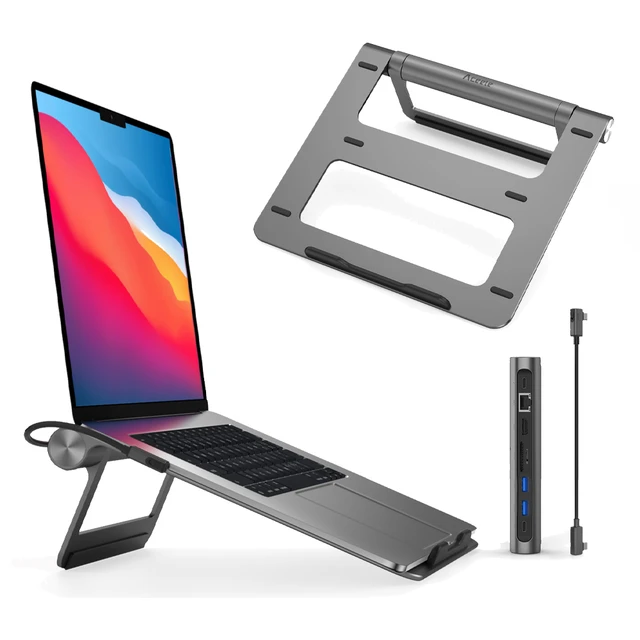

Late 2019 Apple MacBook Pro with 2.4GHz Intel Core i9 (16 inch, 16GB, 1TB SSD) 4GB AMD Radeon Pro 5500M Space Gray

HP 5 Pro 524pf Monitor Overview The HP 5 Pro 524pf is a 24-inch Full HD monitor designed for daily productivity. It delivers clear visuals and a clean modern design. As a result, it fits offices, students, and home workspaces. 24-Inch Full HD Display This monitor features a 24-inch Full HD resolution. Therefore, text appears sharp and easy to read. Moreover, images look clear and balanced. Because of this, it supports long working sessions without fatigue. In addition, wide viewing angles improve visibility. As a result, content stays clear from different positions. Smooth Performance for Daily Tasks The HP 5 Pro 524pf provides smooth visuals for everyday use. As a result, scrolling and browsing feel natural. Furthermore, the display maintains consistent brightness. This improves overall viewing comfort. Eye Comfort and Anti-Glare Screen This monitor includes eye comfort features. Therefore, it helps reduce eye strain during extended use. In addition, the anti-glare coating limits reflections. As a result, the screen stays clear in bright environments. Connectivity and Easy Setup The HP 5 Pro 524pf includes HDMI connectivity. As a result, it connects easily to laptops and desktops. Moreover, setup is quick and simple. Therefore, users can start working immediately. Sleek Design and Mounting Options The monitor features a slim and modern design. In addition, it supports VESA mounting. As a result, users can customize their workspace layout. Ideal for Work and Home Use This monitor focuses on clarity and reliability. Moreover, it suits office work, studying, and media viewing. In conclusion, the HP 5 Pro 524pf is a practical Full HD monitor for everyday use. Specifications: Display: 23.8-inch diagonal, IPS panel, 16:9 aspect ratio, 93 PPI, anti-glare. Performance: 100Hz refresh rate (50-100Hz range), 5ms GtG response time, 350 nits brightness. Connectivity: HDMI 1.4, DisplayPort 1.2, and a USB hub.

Samsung 24″ Essential Monitor Aspect Ratio16:9 Brightness (Typical)250 Contrast Ratio Static1000:1(Typical) Resolution1,920 x 1,080 Response Time5 (GTG) Viewing Angle (H/V)178°/178° Specifications Detail Display Screen Size (Class)24 Flat / CurvedFlat Active Display Size (HxV) (mm)527.04 x 296.46 Aspect Ratio16:9 Panel TypeIPS Brightness (Typical)250 Brightness (Min)200 Contrast Ratio Static1000:1(Typical) Resolution1,920 x 1,080 Response Time5 (GTG) Viewing Angle (H/V)178°/178° Color SupportedMax 16.7M Color Gamut (NTSC 1976)72% (CIE 1931) Refresh RateMax 75Hz General Feature Eco Saving PlusYes Eye Saver ModeYes Flicker FreeYes Game ModeYes Image SizeYes Windows CertificationWindows 10 FreeSyncYes Interface D-Sub1 Display Port Out Version HDMI1 HDMI Version1.4 HDCP Version (HDMI)1.2 USB Hub VersionNo USB-C Charging PowerNo Operation Conditions Temperature10~40 ℃ Humidity10~80, Non-condensing Design Front ColorBLACK Rear ColorBLACK Stand ColorBlack Stand TypeSIMPLE Tilt-2.0°(-1.0°/+2.0°)~20.0°(±2.0°) Wall Mount (mm)100.0 x 100.0 Eco Energy Efficiency ClassB Recycled Plastic20.6 % Power Power SupplyAC 100~240V Power Consumption (Max)25W Power Consumption (Typ)20.0 W Power Consumption (DPMS, W)0.50 Power Consumption (Off Mode, W)0.30 Power Consumption (Yearly)29 kWh/year TypeExternal Adaptor Dimension Set Dimension with Stand (WxHxD, mm)539.5 x 422.8 x 217.4 Set Dimension without Stand (WxHxD, mm)539.5 x 322.8 x 41.2 Package Dimension (WxHxD, mm)607.0 x 147.0 x 380.0 Specifications: Specifications : Aspect Ratio16:9 Brightness (Typical)250 Contrast Ratio Static1000:1(Typical) Resolution1,920 x 1,080 3 Year Warranty

Arabic Silicone Keyboard Skin Cover for MacBook Pro 13" A1708 Without Touch bar and MacBook 12" A1534 with Retina Display US Layout (Black) Arabic Silicone Keyboard Skin Cover for MacBook Pro 13″ A1708 Without Touch bar and MacBook 12″ A1534 with Retina Display US Layout (Black) About this item Arabic language silicone keyboard skin, US version, perfect fit for your MacBook 12″ A1534, which was released in 2015 & new MacBook Pro 13-Inch 13″ Model A1708 without/no Touch Bar, which was released in 2016; Do not fit for Europe Version MacBook Handmade Skin – XSKN is the original Manufacturer of these “Keyboard Art Skin” silicone covers. They are durable, thin and soft with a cashmere feel. The keys fit snug over the keyboard, smooth surface treatment, suit for regular laptop user who types a lot and quickly Each XSKN silicone skin is heat molded to ensure, each color is paints taking hand screened using silicone paint which is heat fuses into the silicone keyboard skin to become one, making it Soft, ultra-thin, durable and easy to washable High quality silicone raw material assure no extension with longtime using. Every detail clearly prinited, imported ink keep it looking good, rubber coating help to remain in good condition Aside from being beautiful they protect your keyboard from spills, crumbs, animal hair and dust. Washable, can be cleaned easily

Genuine-spec touchpad flex cable for MacBook Pro 13″ (Model A2338, 2020, Apple M1)—essential for restoring full Force Touch functionality, haptic feedback, and precise multi-touch gesture control during trackpad repair or replacement. Compatible With: MacBook Pro 13-inch (2020, Model A2338, Model Identifier MacBookPro17,1) with Apple M1 chip (2 Thunderbolt ports). Part Type: Touchpad flex cable only — does not include the trackpad housing, Taptic Engine, or mounting hardware. This is the OEM-style ribbon cable that connects the trackpad to the logic board. Function: Transmits: Touch input coordinates Force Touch pressure data Haptic feedback signals to the Taptic Engine Enables full macOS gesture support: Force Click, three-finger lookup, swipe navigation, pinch-to-zoom, and smooth cursor tracking. Touch input coordinates Force Touch pressure data Haptic feedback signals to the Taptic Engine Enables full macOS gesture support: Force Click, three-finger lookup, swipe navigation, pinch-to-zoom, and smooth cursor tracking. OEM-Quality Build: Matches Apple’s original specifications in: Cable length and routing Connector pitch and ZIF latch design EMI shielding and flex durability Cable length and routing Connector pitch and ZIF latch design EMI shielding and flex durability Common Use Cases: Replacing a torn, creased, or liquid-damaged original flex cable Completing a trackpad replacement when the original cable is compromised Fixing intermittent trackpad behavior, loss of Force Touch, or complete unresponsiveness Replacing a torn, creased, or liquid-damaged original flex cable Completing a trackpad replacement when the original cable is compromised Fixing intermittent trackpad behavior, loss of Force Touch, or complete unresponsiveness Installation Note: Requires full bottom case removal and battery disconnection. Cable routes under internal components near the right speaker and logic board. Connects via a ZIF (Zero Insertion Force) socket—must be aligned carefully and latched gently. Recommended for experienced or certified technicians only. Requires full bottom case removal and battery disconnection. Cable routes under internal components near the right speaker and logic board. Connects via a ZIF (Zero Insertion Force) socket—must be aligned carefully and latched gently. Recommended for experienced or certified technicians only. Important Compatibility Notes: ✅ Only for A2338 (13″, M1, 2020) ❌ Not compatible with: Intel-based A2251 / A2289 (2020) MacBook Air M1 (A2337) Any MacBook Air or 14″/16″ MacBook Pro ✅ Only for A2338 (13″, M1, 2020) ❌ Not compatible with: Intel-based A2251 / A2289 (2020) MacBook Air M1 (A2337) Any MacBook Air or 14″/16″ MacBook Pro Intel-based A2251 / A2289 (2020) MacBook Air M1 (A2337) Any MacBook Air or 14″/16″ MacBook Pro

The Samsung Smart Monitor M7 LS43DM702UMXUE features a 43-inch VA panel with 4K UHD resolution (3840 × 2160). It combines a monitor and smart TV platform in a single display, making it suitable for productivity, entertainment, and streaming without requiring a connected PC. The display supports a maximum refresh rate of 60Hz and provides sharp image quality for office work, media consumption, and general computing tasks. In addition, the 4K resolution offers four times the detail of Full HD content. Samsung equips this model with Tizen OS. Therefore, users can access streaming applications, web services, and smart features directly from the monitor. It also supports Samsung TV Plus and cloud-based productivity applications. Connectivity includes HDMI ports, USB ports, Wi-Fi 5, Bluetooth 5.2, and USB-C. The USB-C connection supports display input, data transfer, and up to 65W power delivery for compatible devices. The monitor includes built-in speakers and supports wireless screen mirroring from compatible smartphones, tablets, and laptops. As a result, users can share content without additional cables. This model focuses on productivity, entertainment, and smart connectivity while providing a large 43-inch 4K display. Specifications: 43-inch VA panel with 3840 × 2160 4K UHD resolution 60Hz refresh rate Tizen OS with built-in streaming applications USB-C with up to 65W Power Delivery Wi-Fi 5, Bluetooth 5.2, HDMI, and USB connectivity

The ASUS VG34VQL3A Curved Gaming Monitor, 34″ WQHD delivers immersive gaming and smooth visuals for modern PC players. It is designed for gamers, creators, and anyone who wants a wider view and fast performance. First, this monitor features a 34-inch Ultra-Wide QHD (3440 × 1440) curved display with a 1500R curvature that wraps around your vision and feels more natural. As a result, games, movies, and multitasking feel more engaging. In addition, the ASUS VG34VQL3A supports a high refresh rate up to 180 Hz (OC) and a 1 ms response time (GTG) for smooth motion and minimal blur. This helps you react faster in fast-paced games. This model also uses AMD FreeSync Premium Pro for adaptive sync technology that reduces screen tearing and stuttering in supported games. Therefore, visuals stay smooth and clear with compatible GPUs. The screen covers 125% of the sRGB color gamut and supports DisplayHDR™ 400 with HDR10, giving bright highlights and rich contrast for vivid colors in HDR content. Thus, games and movies look more dynamic. Because the panel uses VA technology, it delivers deep contrast and solid black levels that make details pop in dark scenes. Also, the anti-glare coating helps reduce reflections in bright rooms. The ASUS VG34VQL3A includes built-in features like Picture-in-Picture (PiP), Picture-by-Picture (PbP), ASUS GamePlus, and low blue light modes for added convenience and comfort. This makes it versatile for work and play. Connectivity options include DisplayPort 1.4, HDMI 2.0, and USB 3.2 Gen 2 hub ports to link to PCs, laptops, and peripherals easily. As a result, setup stays flexible for many systems. The ergonomic stand offers height, tilt, and swivel adjustments plus VESA mount support, so you can position the monitor comfortably. This helps reduce neck and eye strain during long sessions. In conclusion, the ASUS VG34VQL3A Curved Gaming Monitor, 34″ WQHD combines speed, clarity, and wide ultrawide visuals. Overall, it is a strong choice for immersive gaming and productivity. Specifications: Display :34″ VA Panel, 1500R Curved, Anti-Glare. Resolution :Ultrawide QHD (3440 x 1440). Refresh Rate : Up to 180Hz (OC) for smooth motion. Response Time : 1ms (GTG) for reduced ghosting. HDR: Display HDR 400 with HDR10 support for enhanced contrast.

Dell Latitude 5400 — business-class laptop built for reliability and productivity.• Intel Core i5 8th Gen • 8 GB RAM • 256 GB SSD • 14” FHD TouchscreenWindows | Durable Design | Backlit Keyboard

HP SPro 322pe Monitor Overview The HP SPro 322pe is a professional Full HD monitor built for daily business use. It delivers reliable performance and a clean design. As a result, it fits perfectly in offices and work-from-home setups. 21.5-Inch Full HD Display This monitor features a 21.5-inch Full HD resolution. Therefore, text appears sharp and easy to read. Moreover, images look clear and balanced. Because of this, it supports productivity tasks with ease. In addition, the compact size saves desk space. As a result, it works well in smaller work areas. Smooth and Stable Visual Experience The HP SPro 322pe offers smooth and stable visuals. Therefore, everyday tasks feel comfortable. In addition, scrolling and browsing look natural. This makes it suitable for long working hours. Eye Comfort for Long Sessions This monitor includes eye comfort features. As a result, it helps reduce eye fatigue. Moreover, the anti-glare screen improves visibility. Therefore, users stay focused throughout the day. Connectivity and Ease of Use The HP SPro 322pe includes essential connectivity options. As a result, it connects easily to most PCs. Moreover, setup is quick and straightforward. This saves time and effort. Professional Design and Flexibility The monitor features a simple and professional design. In addition, it supports VESA mounting. As a result, users can customize their workspace layout. Ideal for Office and Business Use This monitor focuses on efficiency and reliability. Moreover, it supports daily workloads without distraction. In conclusion, it is a solid choice for professional environments. Specifications: Display : 21.45″ VA Resolution : FHD (1920 X 1080) Connectivity: 1x HDMI 1.4, 1x VGA. Performance: 100Hz refresh rate for smooth motion, 5ms GtG response time.

HP E27q G5 QHD Monitor Firstly, the HP E27q G5 monitor is your gateway to an enhanced visual experience without breaking the bank. Whether you’re working, gaming, or indulging in multimedia content, this monitor has you covered. Secondly, one of the standout features of the HP E27q G5 is its Quad High Definition (QHD) display. This means you can enjoy crystal-clear visuals with sharp details for a wide range of tasks. The 27-inch screen size provides a generous canvas for all your computing needs, from productivity to entertainment. You get more screen real estate to enhance your multitasking capabilities. With a sleek and modern design, the E27q G5 monitor is a stylish addition to any workspace. It effortlessly blends with your existing setup, adding a touch of sophistication. Adjusting the monitor to your desired height is easy, thanks to its ergonomic design. Achieve the perfect viewing angle for comfort during extended work or gaming sessions. Connecting the HP E27q G5 is a straightforward process, and it’s compatible with standard ports for quick setup. No need to deal with complicated installation procedures. This monitor is a cost-effective choice for professionals, gamers, and multimedia enthusiasts. It offers top-notch features without straining your budget, making it an excellent investment. Specifications: QHD (2560 x 1440) 1000:1 5ms GtG (with overdrive) IPS

Genuine-spec touchpad flex cable for MacBook Pro 16″ (Model A2141, 2019, Intel)—essential for restoring full Force Touch functionality, haptic feedback, and precise multi-touch gesture control during trackpad repair or replacement. Compatible With: MacBook Pro 16-inch (2019, Model A2141) with Intel Core i7/i9 processors (Model Identifier: MacBookPro16,1) (Note: A2141 is the non-base configuration of the 2019 16″ MacBook Pro—typically higher-end Intel models.) Part Type: Touchpad flex cable only—does not include the trackpad housing, Taptic Engine, or mounting hardware. This is the OEM-style ribbon cable that connects the trackpad to the logic board. Function: Transmits touch coordinates, Force Touch pressure data, and haptic feedback signals—critical for macOS gestures (e.g., Force Click, three-finger lookup, pinch-to-zoom) and Taptic Engine responsiveness. OEM-Quality Construction: Replicated to Apple’s exact specifications—including cable length, connector pitch, EMI shielding, and bend radius—ensuring reliable signal integrity and long-term durability. Common Use Cases: Replacing a torn, creased, or liquid-damaged original flex cable Completing a trackpad replacement when the original cable is compromised Fixing intermittent trackpad behavior, loss of Force Touch, or complete unresponsiveness Replacing a torn, creased, or liquid-damaged original flex cable Completing a trackpad replacement when the original cable is compromised Fixing intermittent trackpad behavior, loss of Force Touch, or complete unresponsiveness Installation Note: Requires full disassembly of the bottom case, speaker removal, and careful routing beneath the battery and logic board. Connectors use ZIF (Zero Insertion Force) sockets—must be aligned and latched gently. Recommended for certified or professional repair technicians only. Important: This is flex cable only—not a complete trackpad assembly. Must be used with the original or compatible A2141 trackpad and Taptic Engine. Not compatible with M1 MacBook Pro 16″ (A2485), 14″ models (A2442), or any MacBook Air. This is flex cable only—not a complete trackpad assembly. Must be used with the original or compatible A2141 trackpad and Taptic Engine. Not compatible with M1 MacBook Pro 16″ (A2485), 14″ models (A2442), or any MacBook Air. Model Verification: Confirm your device is MacBook Pro A2141 (16″, 2019, Intel) via > About This Mac > Model Identifier (should read MacBookPro16,1).

AOC 27G40E 27-inch 180Hz gaming monitor delivers smooth performance for fast-paced gaming with responsive visuals and modern display features. It is designed for users who want fluid gameplay and reliable everyday performance. Additionally, it features a 27-inch Fast IPS panel. This panel provides wide viewing angles and consistent color accuracy, so it improves both gaming and general use. Moreover, the monitor supports a 180Hz refresh rate with 0.5ms MPRT response time. As a result, it delivers smoother motion and reduces blur during competitive gameplay. The display offers Full HD resolution (1920 × 1080). Therefore, it allows higher frame rates and stable performance, especially in esports titles. In addition, it includes Adaptive Sync and G-SYNC compatibility. This reduces screen tearing and stuttering, so gameplay stays smooth and responsive. Furthermore, it supports HDR10 and gaming features such as Shadow Control and low input lag mode. These features improve visibility and responsiveness during gameplay. The monitor also includes HDMI and DisplayPort connectivity with a slim gaming design. It supports easy setup for PCs and consoles. AOC 27G40E 27-inch 180Hz gaming monitor provides fast refresh performance, responsive gameplay, and essential features for competitive and casual gamers. Specifications: 27-inch Fast IPS panel with wide viewing angles 180Hz refresh rate for ultra-smooth gameplay 0.5ms MPRT response time for reduced motion blur Adaptive Sync and G-SYNC compatible support Full HD 1920 × 1080 resolution for high FPS gaming

The Arzopa A1 is an ultra-slim, lightweight 15.6-inch portable monitor engineered for seamless travel productivity and entertainment. Delivering crisp Full HD imagery on a premium IPS panel with integrated eye care features, it provides a hassle-free plug-and-play experience using dual full-function USB-C and Mini HDMI inputs. Complete with a built-in adjustable kickstand, it is the perfect dual-screen companion for laptops, smartphones, and gaming consoles. ✅ Full Specifications: Model: ARZOPA Type-C Portable Monitor (ARZOPA-A1) Interface / Connection: Multi-Port Input Panel: 2 x USB Type-C Full Function Ports (Supports concurrent video transmission, data, and power delivery) 1 x Mini HDMI Port (Video signal input only) 1 x 3.5mm Headphone / Audio Output Interface Interface / Connection: Multi-Port Input Panel: 2 x USB Type-C Full Function Ports (Supports concurrent video transmission, data, and power delivery) 1 x Mini HDMI Port (Video signal input only) 1 x 3.5mm Headphone / Audio Output Interface Performance / Screen Quality: Panel Type: IPS (In-Plane Switching) display with 178° wide viewing angles Resolution: Full HD 1920 x 1080p Refresh Rate: 60Hz Aspect Ratio: 16:9 Brightness: 300 cd/m² Contrast Ratio: 1200:1 Display Colors: 262K (8-bit) Color Gamut: 45% NTSC / 72% sRGB space coverage Performance / Screen Quality: Panel Type: IPS (In-Plane Switching) display with 178° wide viewing angles Resolution: Full HD 1920 x 1080p Refresh Rate: 60Hz Aspect Ratio: 16:9 Brightness: 300 cd/m² Contrast Ratio: 1200:1 Display Colors: 262K (8-bit) Color Gamut: 45% NTSC / 72% sRGB space coverage Display Technology: Features built-in HDR rendering technology to boost dynamic contrast alongside a Low Blue Light comfort filter to reduce eye fatigue. Audio: Dual built-in stereo speakers (1W x 2 configuration). Material & Build: Premium, durable metal housing constructed out of a sleek aluminum alloy framework. Design & Form Factor: Ultra-thin bezel layout boasting an integrated adjustable smart kickstand for multi-angle landscape deployment. Power Setup: Driverless plug-and-play architecture. Operates without an internal battery; runs on host device power distribution via USB-C or requires an external 5V/3A power input adapter. Compatibility: Fully compatible with MacBooks, Windows PCs/Laptops, Chromebooks, USB-C supported Android smartphones, and modern gaming consoles (Nintendo Switch, Xbox Series X/S, PS4, PS5). Dimensions: Approx. 355.6 x 220.9 x 9.14 mm (Ultra-slim 0.36-inch profile) Weight: Approx. 725 to 735 grams (1.6 lbs lightweight chassis)

The ViewSonic VA2409-H 24″ FHD 750Hz Monitor delivers clear visuals for daily work and home use. Its Full HD resolution shows sharp text and detailed images. The 24-inch screen offers a perfect balance between size and comfort. This makes it ideal for desks with limited space. Moreover, the ViewSonic VA2409-H 24″ FHD 750Hz Monitor offers an ultra-smooth refresh experience for fast screen motion. Scrolling becomes very smooth and clean. Videos appear fluid with less blur. As a result, motion looks natural and easy on the eyes. In addition, the monitor uses IPS panel technology for wide viewing angles. Colors stay accurate from every direction. This helps during shared screen use and teamwork. The image remains bright and steady at all times. Furthermore, the ViewSonic VA2409-H 24″ FHD 750Hz Monitor includes eye comfort features for daily protection. The low blue light mode helps reduce eye strain. The flicker-free design supports long viewing hours without discomfort. These features improve comfort during long work sessions. Also, the monitor supports flexible connection options for easy setup. It includes HDMI and VGA for wide device compatibility. You can connect laptops, desktops, and media devices easily. Switching between devices becomes fast and simple. In addition, the slim bezel design gives a clean and modern look. It fits well in both home and office setups. The stand supports tilt adjustment for basic viewing comfort. Wall mounting is also supported for a clean desk setup. Moreover, the display works well for office tasks, browsing, and media viewing. Text appears sharp and easy to read. Daily tasks feel smoother and more organized. The monitor blends easily into any workspace style. Overall, the ViewSonic VA2409-H 24″ FHD 750Hz Monitor offers clarity, smooth motion, and daily comfort. It supports work, study, and entertainment with ease. This monitor is a strong choice for users seeking smooth and simple screen performance. Specifications: Display : 24″ IPS Resolution : FHD 1920 x 1080 Refresh Rate : 75Hz Response Time : 3ms

The HP 25X Gaming 25″ Monitor delivers fast, smooth visuals for gaming and everyday use.It features a 25‑inch FHD display that shows crisp images and fluid motion.Moreover, the high refresh rate keeps gameplay smooth and responsive. This gaming monitor uses a panel with wide viewing angles and vibrant color.Additionally, its fast response time helps reduce motion blur during intense action.Anti‑glare coating helps reduce reflections in bright lighting. The HP 25X Gaming Monitor includes HDMI and DisplayPort inputs for easy connection to PCs and consoles.Furthermore, tilt adjustment lets you find a comfortable viewing angle.Low blue light and flicker‑free features help reduce eye strain during long sessions. This display works well for competitive gamers, students, and home users alike.Therefore, it supports gaming, streaming, and everyday computing.Finally, it combines speed, good visuals, and comfort features for daily use. Specifications: 25″ Full HD (1920 × 1080) panel High refresh rate (typically 144 Hz) for smooth motion Fast response time (often 1 ms) for competitive play HDMI + DisplayPort ports for device connection Anti‑glare finish with low blue light & flicker‑free tech

Genuine-spec US layout (QWERTY) keyboard replacement in Midnight Blue for MacBook Air 13.6″ (Model A2681, M2, 2022)—featuring Apple’s Magic Keyboard with scissor-switch mechanism, backlighting, and precise OEM fit. Compatible With: MacBook Air 13.6-inch (2022, Model A2681) with Apple M2 chip – specifically designed for the Midnight color variant. Layout: Standard US English (QWERTY) with wide Enter key, inverted-T arrow keys, and full function row—matches Apple’s original US configuration. Design: Apple’s Magic Keyboard with scissor-switch mechanism—offering quiet, stable keystrokes, 1mm key travel, and enhanced durability over older Butterfly designs. Color: Midnight Blue keycaps—specially matched to the Midnight finish of the A2681 MacBook Air for seamless visual integration. (Note: This keyboard is not recommended for Silver, Space Gray, or Starlight models due to color mismatch.) Features: Integrated backlighting, ambient light sensor compatibility, and OEM-style flex cable connector for direct logic board connection. Precision Fit: Engineered to exact Apple specifications for alignment, key spacing, and mounting—ensures a flush, secure fit within the original top case. Installation Note: The keyboard is factory-glued into the top case. Replacement requires full disassembly and professional-grade re-adhesion. Recommended for experienced technicians only.

The Lenovo G34w-10 34″ Monitor delivers immersive and smooth visuals for gaming and multimedia.It features a 34-inch WQHD curved display that provides crisp details and vibrant colors. Moreover, its high refresh rate ensures fluid motion in fast-paced games and videos. This monitor uses a VA panel for strong contrast and wide viewing angles. Additionally, the fast response time helps reduce blur and ghosting during competitive gaming. The curved design and anti-glare screen enhance immersion and minimize reflections in bright environments. HDMI and DisplayPort inputs allow easy connection to PCs, laptops, and gaming consoles. Furthermore, tilt adjustment helps you find a comfortable viewing angle during long sessions. Low blue light and flicker-free technologies reduce eye strain over extended use. This display is ideal for gamers, streamers, and home users alike. Therefore, it supports competitive gaming, media streaming, and everyday computing. Finally, it combines immersive visuals, fast performance, and comfort features for daily use. Specifications: Screen Size: 34″ WQHD curved VA panel Resolution: 3440 × 1440 Refresh Rate: High for smooth motion Ports: HDMI + DisplayPort Features: Anti-glare, low blue light, flicker-free eye care

The MSI Optix G32CQ4 E2 32″ Monitor delivers immersive visuals and smooth performance for gaming, work, and entertainment. Its large 32‑inch screen provides plenty of space for multitasking, movies, and gaming sessions. Moreover, the curved design wraps the display slightly around your field of view, enhancing immersion and reducing eye strain during long use. This monitor features a clear and detailed display that brings games, videos, and content to life with vivid colors and contrast. Additionally, its high refresh rate helps reduce motion blur, making gameplay feel smoother and more responsive. The sleek and modern design fits easily into gaming setups, home offices, and creative workspaces. The MSI Optix G32CQ4 E2 includes multiple connectivity options, allowing you to connect PCs, laptops, and consoles with ease. Furthermore, ergonomic tilt adjustment helps you find a comfortable viewing angle during extended sessions. Therefore, it is ideal for gamers, students, and professionals who want a versatile and immersive display. Finally, it combines large‑screen comfort, smooth visuals, and practical design for everyday use. Specifications: Display : 31.5″ VA Resolution : 2560 x 1440 (WQHD) Refresh Rate : 170Hz Response Rate : 1ms Curvature : 1500R

BenQ RE03A 86 inch Board Essential RE8603A is designed for classrooms, training rooms, and interactive presentations. It features an 86-inch 4K UHD IPS display with precision IR touch technology for smooth writing and collaboration. Additionally, it supports up to 40 touch points. Therefore, it helps teachers and teams work together more efficiently. The BenQ RE8603A delivers 3840 × 2160 resolution with 450 nits brightness and anti-glare coating for clear viewing in bright rooms. Moreover, it uses 9H tempered glass for better durability and safer daily use. It also includes low blue light and flicker-free technology to reduce eye strain. In addition, it runs on Android 11 with 4GB memory and 32GB storage for smooth system performance. Furthermore, it provides 3 HDMI 2.0 ports, DisplayPort, USB-A, USB-C, and USB-B for flexible connectivity. As a result, users can connect laptops, cameras, and classroom devices easily. It also includes front-facing 2 × 20W speakers and built-in management tools for daily educational use. Specifications: 86-inch 4K UHD (3840 × 2160) IPS display Precision IR touch with up to 40 touch points Android 11 with 4GB RAM and 32GB storage 450 nits brightness with anti-glare 9H tempered glass 3 HDMI 2.0, DisplayPort, USB-C, and dual 20W speakers

HP P24q G4 QHD Height Adjust Monitor Are you seeking a monitor that can elevate your workstation’s comfort and productivity? Meet the HP P24q G4 QHD Height Adjust Monitor, a versatile solution designed to meet your needs. One of the key features of the HP P24q G4 is its Quad High Definition (QHD) display. With four times the resolution of standard HD, you’ll experience stunning clarity and detail in your work and entertainment. The 24-inch screen size strikes a perfect balance, providing enough space for multitasking without taking up excessive desk space. It’s a comfortable and functional addition to any workspace. Adjusting the monitor to your preferred height is effortless, thanks to its height-adjustable stand. This allows you to tailor your viewing angle for maximum comfort, reducing strain during extended work hours. Setting up the P24q G4 is a straightforward process. Connect it to your PC or laptop through standard ports, and you’re ready to enhance your workspace. Say goodbye to complicated installation procedures. The monitor’s modern design not only complements your workspace but also adds a touch of sophistication. It blends seamlessly with your existing setup, enhancing the overall aesthetics. Whether you’re a professional or a casual user, the HP P24q G4 offers fantastic value for your investment. Its affordable price point ensures that you can enjoy top-notch features without breaking the bank. Specifications: 60.45 cm (23.8″) QHD (2560 x 1440) Asset control; Language selection; On-screen controls; Pivot rotation; Plug and Play; User controls; Anti-glare Response time: 5ms GtG (with overdrive) HDMI; VGA
