
Genuine-spec US layout keyboard replacement for MacBook Air 13″ (Model A2338, 2020)—featuring Apple’s reliable Magic Keyboard with scissor-switch mechanism, backlighting, and full OEM fit for seamless repair. Compatible With: MacBook Air 13-inch (2020, Model A2338) – includes both Intel Core i3/i5/i7 and M1 chip variants. Keyboard Type: Apple’s Magic Keyboard with scissor-switch mechanism—offering improved durability, quieter typing, and 1mm key travel compared to older Butterfly keyboards. Layout: Standard US English (QWERTY), with full-size keys, inverted-T arrow keys, and dedicated function row. Integrated Features: Backlit keys for low-light use, ambient light sensor compatibility, and original-style ribbon cable connector for direct logic board connection. Precision Fit: Engineered to match Apple’s exact dimensions and mounting points—ensures flush alignment within the original top case. Installation Note: The keyboard is adhered to the top case and requires careful removal and re-gluing. Full disassembly is needed. Recommended for skilled technicians or professional repair centers.

A well-equipped pre-owned Dell Latitude 5410 with 14" display, 10th Gen Core i5, 16GB RAM, and 512GB SSD—delivering strong performance, security, and portability for business and professional use.

✅ Full Specifications: Model: HyperX Cloud II Headphone Type: Over-Ear, Closed-Back Gaming Headset Connection: Wired USB for PC/Mac 3.5mm jack for consoles & mobile Drivers: 53mm Neodymium Surround Sound: Virtual 7.1 Surround Sound (via USB sound card) Frequency Response: Headphones: 15Hz – 25kHz Microphone: 50Hz – 18kHz Impedance: 60 Ohms Sound Pressure Level: 98 ± 3 dB Microphone: Detachable noise-canceling mic TeamSpeak & Discord certified Build: Aluminum frame Memory foam ear cushions Leatherette or velour ear pads Cable Length: 1m headset cable 2m extension with USB control box Compatibility: PC, Mac, PS4, PS5, Xbox (via 3.5mm), Nintendo Switch, Mobile

Genuine-quality replacement A1989 battery testing flex cable—brand new and ready for professional MacBook Pro 15" (2018–2019) battery diagnostics and repairs. Genuine-quality replacement A1989 battery testing flex cable—brand new and ready for professional MacBook Pro 15″ (2018–2019) battery diagnostics and repairs. This is a brand-new A1989 Battery Testing Flex Cable, designed specifically for use in MacBook Pro 15-inch models from 2018 and 2019 (A1989) during battery replacement or diagnostic procedures. The flex cable connects the battery to the logic board’s test points, allowing technicians to verify battery health, voltage, and communication before final reassembly—ensuring safe and accurate repairs. Made with high-quality materials and precise engineering, this flex cable matches OEM specifications for fit, function, and reliability. It’s an essential tool for certified repair shops, independent technicians, and advanced DIYers performing battery servicing on T2-chip MacBook Pro models. Please note: This is not a full battery—it is the small flex cable used during battery testing and installation. Proper handling and ESD-safe practices are recommended during installation. Compatible with: MacBook Pro 15″ (2018, A1989) MacBook Pro 15″ (2019, A1989)

WiWU Infinite USB‑C to HDMI Adapter (HB004) – Sleek aluminum dongle offering 4K@60Hz output over USB‑C (DP Alt‑Mode), plug-and-play with no drivers needed.Compact, portable, and reliable—a must-have for mobile productivity, gaming, and media streaming. Model: WiWU Infinite USB‑C to HDMI Adapter (HB004) Video Output: HDMI 2.0, supports up to 4K @ 60 Hz resolution Material & Weight: Robust aluminum alloy body, compact, weighs ~69 g Compatibility: Plug-and-play connector works with USB‑C devices supporting DP Alt‑Mode—compatible with laptops, smartphones, tablets, consoles Design & Build: Slim, portable, durable—no driver/software required Use Cases: Ideal for mirroring/extending screens for presentations, streaming, gaming

Battery Replacement for A1819 MacBook Pro 13" A1706 Late 2016 Mid 2017 MLH12LL MLH12LL/A MLH12LL/A MPXV2LL MPXV2LL/A MPXV2LL/A Battery Replacement for A1819 MacBook Pro 13″ A1706 Late 2016 Mid 2017 MLH12LL MLH12LL/A MLH12LL/A MPXV2LL MPXV2LL/A MPXV2LL/A 【Technical Details:】 Model Number: A1819; Battery type: Li-ion; Voltage: 11.1V; Capacity: 4300mAh 49.02Wh,Condition: brand new 【Compatible with:】 Mid 2017 MacBook Pro 13-inch Series: MacBook Pro 13 inch Touch A1706(Mid 2017); MacBook Pro 13 inch A1706(EMC 3163) (Mid 2017); MacBook Pro 13-inch MPXV2LL/A or MPXW2LL/A or MPXX2LL/A or MPXY2LL/A 【Compatible with:】MacBook Pro 13 inch Touch A1706(Late 2016); MacBook Pro 13 inch A1706(EMC 3071) (Late 2016); MacBook Pro 13-inch MLH12LL/A or MLVP2LL/A or MNQF2LL/A or MNQG2LL/A 【Compatible with:】2016 2017 MacBook Pro 13″ Four Thunderbolt 3 Ports A1706 model: MacBook Pro 13″ Touch i5 2.9GHz A1706(Late 2016); MacBook Pro 13″ Touch i5 3.1GHz A1706(Late 2016); MacBook Pro 13″ Touch i5 3.1GHz A1706(Mid 2017); MacBook Pro 13″ Touch i5 3.3GHz A1706(Mid 2017); MacBook Pro 13″ Touch i7 3.3GHz A1706(Late 2016); MacBook Pro 13″ Touch i7 3.5GHz A1706(Mid 2017)

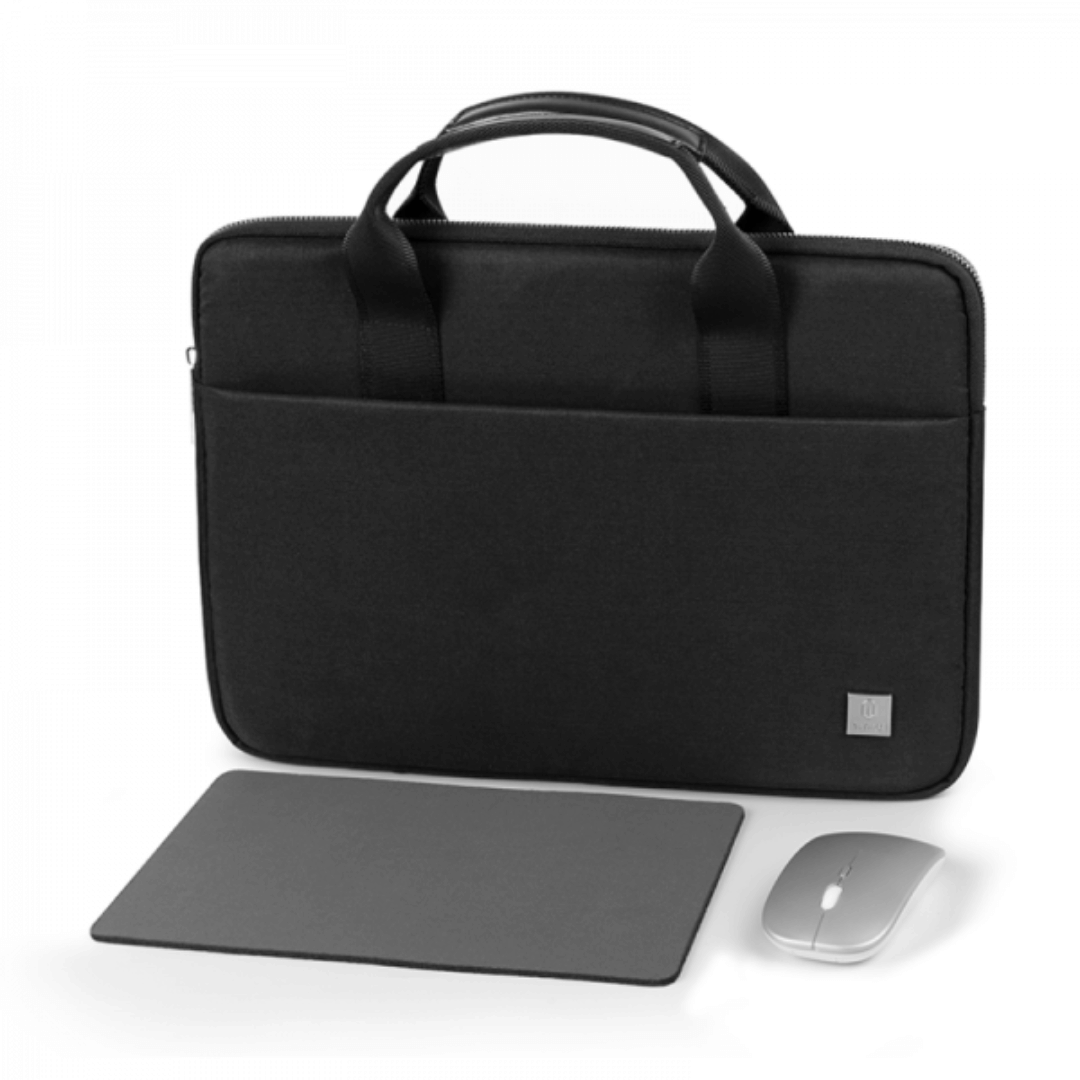
WiWU Pioneer Pro Handbag – Stylish, waterproof laptop bag with soft-lined padded interior and reinforced corners.Ideal for 14″ and 15.6″ laptops, offering excellent protection, comfort, and everyday utility. Model: WiWU Pioneer Pro Sizes: Designed for both 14″ and 15.6″ laptops Material: Durable, water-resistant polyester exterior Interior: Faux-fur lining with thick anti-shock padding Protection: 360° corner reinforcement for enhanced drop resistance Compartments: Main padded laptop section Zippered front organizer for cables, mouse, notebook, and accessories Compartments: Main padded laptop section Zippered front organizer for cables, mouse, notebook, and accessories Carry Options: Top retractable waterproof TPU handle Adjustable and removable shoulder strap Luggage trolley strap on the back Carry Options: Top retractable waterproof TPU handle Adjustable and removable shoulder strap Luggage trolley strap on the back Zippers: High-quality YKK zippers for smooth operation Design: Slim profile, minimalist look, available in Black and Gray Suitable for: Business, school, travel, and daily professional use

Genuine-spec Touch Bar assembly with integrated flex cable for 2020 MacBook Pro 13″ models (A2251, A2289, A2338)—restores full Touch ID and Touch Bar functionality with OEM-level fit and performance. Compatible With: MacBook Pro 13″ (2020): A2251 (Intel Core i5/i7, two Thunderbolt ports) A2289 (Intel Core i5/i7, four Thunderbolt ports) A2338 (Apple M1 chip, two Thunderbolt ports) MacBook Pro 13″ (2020): A2251 (Intel Core i5/i7, two Thunderbolt ports) A2289 (Intel Core i5/i7, four Thunderbolt ports) A2338 (Apple M1 chip, two Thunderbolt ports) A2251 (Intel Core i5/i7, two Thunderbolt ports) A2289 (Intel Core i5/i7, four Thunderbolt ports) A2338 (Apple M1 chip, two Thunderbolt ports) Includes: Complete Touch Bar module with integrated flex cable, Touch ID sensor, and ambient light sensor—ready for direct connection to the logic board. Functionality: Fully restores dynamic Touch Bar controls, system functions, app shortcuts, and Touch ID (fingerprint authentication and power button). OEM-Quality Build: Matches Apple’s original design in responsiveness, finish, and sensor alignment—ensures seamless integration with macOS. Color Options: Available in Space Gray and Silver to match your MacBook’s top case (confirm your model’s color before ordering). Installation Note: Requires full top case disassembly and careful handling of adhesive and connectors. The flex cable routes under the speakers and connects near the logic board—precision is essential. Recommended for experienced technicians.

Fast-charging feature available on select iPhone and iPad models.

The 45W MagSafe 2 Power Adapter features a magnetic DC connector so if someone should trip over it, the cord disconnects harmlessly and your MacBook Air stays put safely. It also helps prevent fraying or weakening of the cables over time. In addition, the magnetic DC helps guide the plug into the system for a quick and secure connection. The 45W MagSafe 2 Power Adapter features a magnetic DC connector so if someone should trip over it, the cord disconnects harmlessly and your MacBook Air stays put safely. It also helps prevent fraying or weakening of the cables over time. In addition, the magnetic DC helps guide the plug into the system for a quick and secure connection. When the connection is secure, an LED located at the head of the DC connector lights up; an amber light lets you know that your notebook is charging, while a green light tells you that you have a full charge. An AC cord is provided with the adapter for maximum cord length, while the AC wall adapter (also provided) gives you an even easier and more compact way to travel. Designed to be the perfect traveling companion, the adapter has a clever design which allows the DC cable to be wound neatly around itself for easy cable storage. This power adapter recharges the lithium polymer battery while the system is off, on, or in sleep mode. It also powers the system if you choose to operate without a battery. Compatible only with MacBook Air featuring MagSafe 2 power port. Knowing which specific Mac model you have is important. If you are running OS X Lion (10.7) or later go to the “” menu at the top left of your screen, choose “About this Mac” then click the “More Info…” button. Your Mac model and generation will be displayed. If you are running an earlier version of OS X, you can enter your serial number here to find out which model you have. Mac Models MacBook Air (13-inch, Early 2015 – 2017) MacBook Air (11-inch, Early 2015)

The Dell OptiPlex 3040 Micro delivers dependable business performance in a compact, energy-efficient design. Featuring an Intel Core i5 6th Gen processor, 8GB DDR3L RAM, and SSD storage options, it is built for smooth multitasking, fast startups, and reliable operation in professional environments.

Remax F27 Fonzyr Desktop Fan – 5 W rechargeable fan with 360° adjustable airflow and multi-installation options.Compact (187×206 mm), lightweight, with fast Type-C charging (~2 h) and built-in 1,200 mAh battery. Model: Remax F27 Fonzyr Series Circulation Desktop Fan Power: 5 W, operates on 5 V/1 A power supply Rotation: 360° adjustable airflow for full-range ventilation Battery: Built-in 1,200 mAh rechargeable battery; Type-C charging, ~2 hours charging time Dimensions & Build: Approx. 187 × 206 mm, lightweight ABS plastic housing (~697 g) Installation: Designed for desktop use, wall mounting, or hanging—ideal for multi-location placement

Genuine-spec US layout keyboard replacement for MacBook Pro (Model A1398, Late 2011–Mid 2012)—featuring durable scissor-switch keys, backlighting, and OEM-fit design for reliable typing and straightforward installation. Compatible With: MacBook Pro 13″: Late 2011 (Model A1278, but labeled A1398 in some regions) – Model Identifier MacBookPro8,1 MacBook Pro 15″: Early 2011, Late 2011, and Mid 2012 – Model Identifiers MacBookPro8,2 (15″ early/late 2011) and MacBookPro9,1 (15″ mid 2012) *(Note: “A1398” is primarily associated with the 15″ unibody MacBook Pro with Retina display (Mid 2012), which was the first Retina MacBook Pro.)* This keyboard fits the non-Retina 15″ A1398 (Mid 2012) and compatible Late 2011 models. MacBook Pro 13″: Late 2011 (Model A1278, but labeled A1398 in some regions) – Model Identifier MacBookPro8,1 MacBook Pro 15″: Early 2011, Late 2011, and Mid 2012 – Model Identifiers MacBookPro8,2 (15″ early/late 2011) and MacBookPro9,1 (15″ mid 2012) *(Note: “A1398” is primarily associated with the 15″ unibody MacBook Pro with Retina display (Mid 2012), which was the first Retina MacBook Pro.)* This keyboard fits the non-Retina 15″ A1398 (Mid 2012) and compatible Late 2011 models. Layout: Standard US English (QWERTY) with full-size keys, inverted-T arrow keys, and dedicated function row (F1–F12). Keyboard Type: Traditional scissor-switch mechanism—robust, tactile, and serviceable (pre-Butterfly era). Integrated Features: Backlit keys (adjustable brightness via F5/F6) OEM ribbon cable with ZIF connector Matches original key spacing and actuation force Backlit keys (adjustable brightness via F5/F6) OEM ribbon cable with ZIF connector Matches original key spacing and actuation force Build & Fit: Precision-molded plastic frame with exact screw mounts and alignment pegs—ensures secure, rattle-free installation in the top case. Installation Note: Keyboard is secured with screws and minimal adhesive. Requires full top case access and battery disconnect. Recommended for intermediate to advanced users or technicians.

PCE 1500 M8 1500VA 600W PCE UPS SYSTEM M8-1500 1500VA 600W Input Voltage: 220/230/240 VAC, 1Ø2Wires Input Frequency: 50 or 60 Hz +/-10% (auto sensing) Power: 600W Output voltage: 220/230/240VAC+/-1% Output Frequency: 50 or 60 Hz +/-1% Full Protection: Overload, discharge, and overcharge protection PCE UPS SYSTEM M8-1500 1500VA 600W Input Voltage: 220/230/240 VAC, 1Ø2Wires Input Frequency: 50 or 60 Hz +/-10% (auto sensing) Power: 600W Output voltage: 220/230/240VAC+/-1% Output Frequency: 50 or 60 Hz +/-1% Full Protection: Overload, discharge, and overcharge protection

Experience elite performance with the Lenovo ThinkPad E14 Gen 3, powered by the AMD Ryzen 7 5700U 8-core processor. Featuring 16GB RAM, a lightning-fast 512GB NVMe SSD, and a professional 14-inch FHD display, this laptop is engineered for high-level productivity and military-grade durability.

The Cudy WR1200 AC1200 Router offers flexible networking with its 5-in-1 functionality and dual-band WiFi speeds up to 1200Mbps. Ideal for home and office use, it provides stable connectivity, wide coverage, and multiple operating modes to suit different network needs. AC1200 Dual Band WiFi – Combined speeds of up to 1200Mbps (300Mbps on 2.4GHz + 867Mbps on 5GHz) for smooth browsing, streaming, and gaming. 5-in-1 Multi-Mode Functionality – Works as Router, Access Point, Range Extender, WISP, and Client for maximum flexibility. Wide Coverage – High-gain antennas ensure strong and stable WiFi signal throughout your home or office. Fast Ethernet Ports – Reliable wired connections for computers, smart TVs, and other devices. Easy Setup & Management – Simple configuration through an intuitive web interface. Stable Multi-Device Performance – Designed to handle multiple connected devices efficiently. Secure Network – WPA/WPA2 encryption keeps your connection safe and private. 1 × WAN Port 4 × LAN Ports Dual Band WiFi (2.4GHz & 5GHz) Ethernet (RJ45) Wireless Security (WPA/WPA2)

0G74G Laptop Battery Replacement for Dell Latitude 5300 2-in-1 5310 7300 7400 Series Notebook OG74G 02PFPW 2PFPW 3KF82 8JYHH 11.4V 42Wh 3-Cell About this item Specification: Battery type: Li-ion. Color: Black. Voltage: 11.4V. Capacity: 42Wh/3Cell. New from Manufacturer Replace Part Number: For MXV9V 0G74G 00G74G 2PFPW 3KF82 8JYHH Compatible Models: Replacement for Dell Latitude 5300 E5300 / 5300 2-in-1 / 5310 E5310 / 5310 2-in-1 / 7300 E7300 / 7400 E7400 Series (Important Note: NOT fit for latitude 7400 2-in-1 Series) Note: The Dell laptop models on this product page are compatible with 2 battery models: 0G74G (42Wh 3-Cell 11.4V) , MXV9V(60Wh 4-Cell 7.6V). Please open the back cover of your laptop to check the original battery size and capacity before placing an order. Make sure that the battery model you need is 0G74G (42Wh 3-Cell 11.4V). Note: If the new battery is not recognized during the initial installation, please reinstall and check if the interface is fully connected. Discharge the new battery to 10-20% (not 0%), then charge and cycle 3-4 times to wake up the new battery

Genuine-spec touchpad flex cable for MacBook Pro 16″ (Model A2159, 2019, Intel)—essential for restoring full Force Touch functionality, haptic feedback, and precise trackpad responsiveness during repair or replacement. Compatible With: MacBook Pro 16-inch (2019, Model A2159) with Intel Core i7/i9 processors (Model Identifier: MacBookPro16,1). Part Type: Touchpad flex cable only—does not include the trackpad, Taptic Engine, or mounting hardware. This is the OEM-style ribbon cable that connects the trackpad to the logic board. Function: Transmits touch input, Force Touch pressure data, and haptic feedback signals—critical for macOS gestures (e.g., Force Click, three-finger swipe, pinch-to-zoom) and Taptic Engine operation. OEM-Quality Build: Matches Apple’s original flex circuit in length, connector pitch, shielding, and bend radius—ensures reliable signal integrity and durability under repeated use. Common Use Cases: Replacing a torn, frayed, or corroded original flex cable Completing a trackpad replacement when the original cable is damaged Fixing intermittent or unresponsive trackpad behavior caused by cable failure Replacing a torn, frayed, or corroded original flex cable Completing a trackpad replacement when the original cable is damaged Fixing intermittent or unresponsive trackpad behavior caused by cable failure Installation Note: Requires full bottom case removal and careful routing beneath the battery and logic board. Connectors use ZIF (Zero Insertion Force) sockets—must be properly aligned and latched without force. Recommended for certified or experienced technicians only.

Genuine-spec touchpad flex cable for MacBook Pro 16″ (Model A2485, 2021, M1 Pro/Max)—critical for restoring full Force Touch functionality, haptic feedback, and precise multi-touch gesture control during trackpad repairs. Compatible With: MacBook Pro 16-inch (2021, Model A2485) with Apple M1 Pro or M1 Max chip (Model Identifiers: MacBookPro18,1 / MacBookPro18,2). Part Type: Touchpad flex cable only—does not include the trackpad, Taptic Engine, or mounting hardware. This is the OEM-style ribbon cable that connects the trackpad to the logic board. Function: Transmits touch coordinates, Force Touch pressure data, and haptic feedback signals—essential for macOS gestures (e.g., pinch-to-zoom, Force Click, three-finger lookup) and Taptic Engine operation. OEM-Quality Construction: Precisely replicated to Apple’s original specifications—including cable length, connector type, EMI shielding, and flex routing—ensuring signal integrity and long-term reliability. Common Use Cases: Replacing a torn, frayed, or liquid-damaged original flex cable Completing a trackpad replacement when the original cable is compromised Fixing intermittent trackpad behavior, lost Force Touch, or complete unresponsiveness Replacing a torn, frayed, or liquid-damaged original flex cable Completing a trackpad replacement when the original cable is compromised Fixing intermittent trackpad behavior, lost Force Touch, or complete unresponsiveness Installation Note: Requires full disassembly of the bottom case and careful routing around the battery and logic board. Connectors use ZIF (Zero Insertion Force) sockets—must be aligned and latched gently. Recommended for certified or professional repair technicians only.

