
WiWU 20W fast Charger for Mobile Phone with USB C Quick Power Adapter in white Wall charger

Foloda Wireless Number Pads, Numeric Keypad Numpad 22 Keys Portable 2.4 GHz Financial Accounting Number Keyboard Extensions 10 Key for Laptop, PC, Desktop, Surface Pro, Notebook

lenovo battery L14M3P24 11.1V 45Wh 4050mAh L14M3P24 Battery COMPATIBLE L14S3P24 L14M3P24 L16M3P24 LAPTOP BATTERY FOR LENOVO IDEAPAD XIAOXIN 700 R720 Y700-14ISK Y520-15IKB Y720-14ISK SERIES 4 Cell Laptop Battery About this item Condition: New Voltage: 11.1V Capacity: 45Wh/4050mAh Replace Part Number: L14M3P24 L14S3P24 Fit For: Lenovo Ideapad 700 Ideapad 700 Series The Package Includes 1X L14M3P24 battery. Before purchasing, please open the laptop’s back cover to confirm the battery model and capacity. Raise the battery life: 1:After receiving the battery, Please charge it fully, then discharge it to around 10%, and do it three times. 2:If you don’t use the battery for a long time, please charge and discharge it once a month

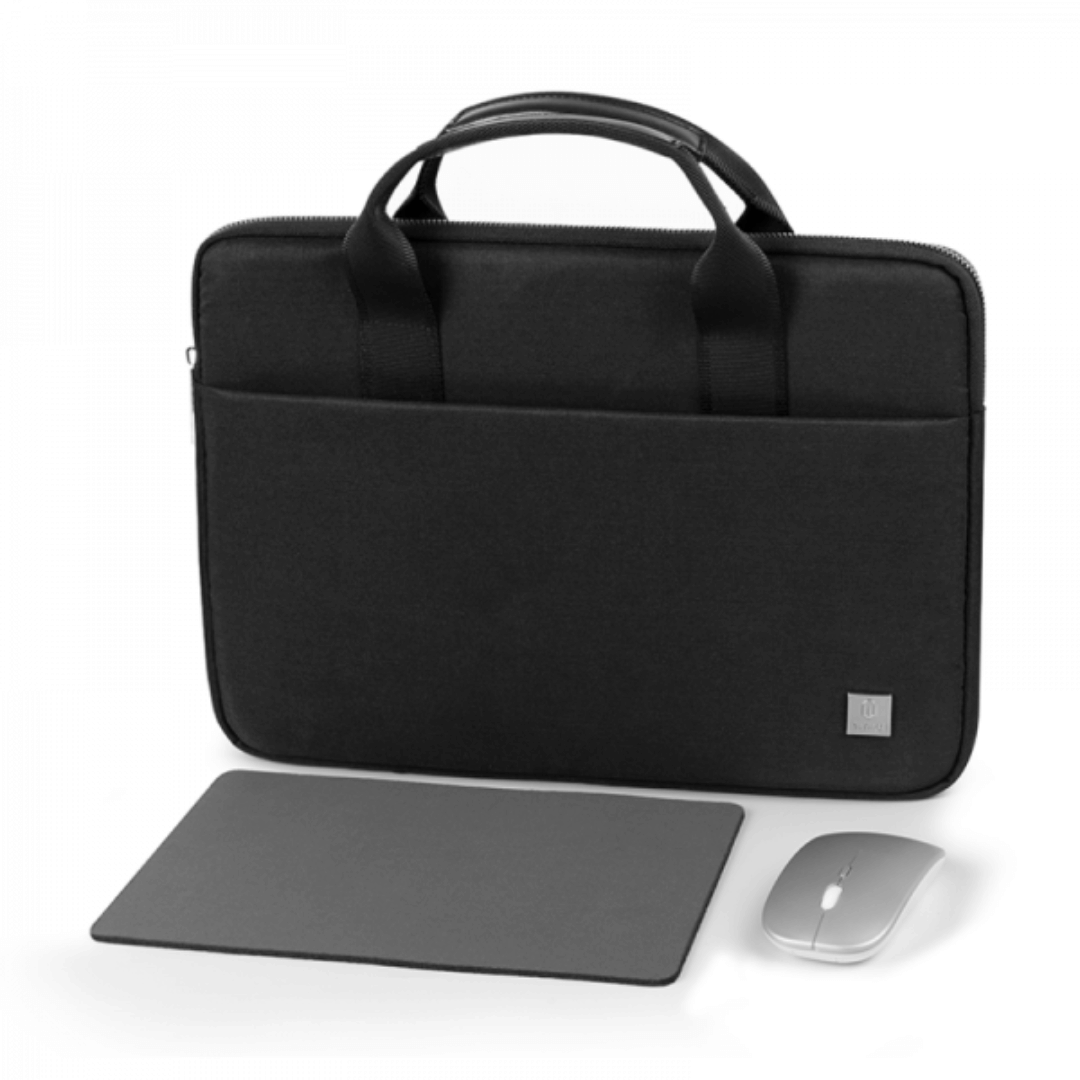
WIWU Alpha tech pouch 1.Designed for Mac book accessories 2.Exquisite internal storage space, neat and tidy, get rid of clutter 3.Durable YKK water resistance zipper

BATTERY DELL 6MT4T CYDZ 62W 7.6V Laptop Battery Compatible with Dell Latitude 5470 E5470 155570 E5570 3510 M3510 7V69Y, TXF9M, 79VRK, 07V69Y, 0HK6DV, 079VRK, 0TXF9M About this item 6MT4T Voltage: 7.6V, Capacity: 62Wh Compatible Part Number: 7V69Y, TXF9M, 79VRK, 07V69Y, 0HK6DV, 079VRK, 0TXF9M Compatible for Dell Latitude 14 Series 5470 E5470 155570 E5570 Series Compatible for Dell Latitude 15 Series Precision 15 3510 M3510.

lenovo battery 00NY486 48Wh 4.4Ah Battery Replacement for Lenovo ThinkPad L560 20F1 20F2 L570 20J8 20J9 20JQ 20JR Series Laptop SB10H45071 00NY487 SB10H45072 00NY488 SB10H45073 00NY489 SB10H45074 71+ 10.8V About this item 【Battery Model】00NY486; Voltage:10.8V; Capatity:48Wh 4.4Ah 6-Cells; Color:Black; Condition:Brand New. 【Replacement Part Number】00NY486 SB10H45071 00NY487 SB10H45072 00NY488 SB10H45073 00NY489 SB10H45074 71+ 【Compatible Machine Models】 for Lenovo ThinkPad L560 (Type 20F1 20F2) Series; for Lenovo ThinkPad L570 (type 20J8 20J9 20JQ 20JR) Series 【Security Certified】 Certified by CE, UL, FCC, and RoHS for safety. Every battery has passed factory testing, built-in circuit protection ensures safety and stability. More than 500 recharge cycles over the life of the battery.

The Arzopa A1 is an ultra-slim, lightweight 15.6-inch portable monitor engineered for seamless travel productivity and entertainment. Delivering crisp Full HD imagery on a premium IPS panel with integrated eye care features, it provides a hassle-free plug-and-play experience using dual full-function USB-C and Mini HDMI inputs. Complete with a built-in adjustable kickstand, it is the perfect dual-screen companion for laptops, smartphones, and gaming consoles. ✅ Full Specifications: Model: ARZOPA Type-C Portable Monitor (ARZOPA-A1) Interface / Connection: Multi-Port Input Panel: 2 x USB Type-C Full Function Ports (Supports concurrent video transmission, data, and power delivery) 1 x Mini HDMI Port (Video signal input only) 1 x 3.5mm Headphone / Audio Output Interface Interface / Connection: Multi-Port Input Panel: 2 x USB Type-C Full Function Ports (Supports concurrent video transmission, data, and power delivery) 1 x Mini HDMI Port (Video signal input only) 1 x 3.5mm Headphone / Audio Output Interface Performance / Screen Quality: Panel Type: IPS (In-Plane Switching) display with 178° wide viewing angles Resolution: Full HD 1920 x 1080p Refresh Rate: 60Hz Aspect Ratio: 16:9 Brightness: 300 cd/m² Contrast Ratio: 1200:1 Display Colors: 262K (8-bit) Color Gamut: 45% NTSC / 72% sRGB space coverage Performance / Screen Quality: Panel Type: IPS (In-Plane Switching) display with 178° wide viewing angles Resolution: Full HD 1920 x 1080p Refresh Rate: 60Hz Aspect Ratio: 16:9 Brightness: 300 cd/m² Contrast Ratio: 1200:1 Display Colors: 262K (8-bit) Color Gamut: 45% NTSC / 72% sRGB space coverage Display Technology: Features built-in HDR rendering technology to boost dynamic contrast alongside a Low Blue Light comfort filter to reduce eye fatigue. Audio: Dual built-in stereo speakers (1W x 2 configuration). Material & Build: Premium, durable metal housing constructed out of a sleek aluminum alloy framework. Design & Form Factor: Ultra-thin bezel layout boasting an integrated adjustable smart kickstand for multi-angle landscape deployment. Power Setup: Driverless plug-and-play architecture. Operates without an internal battery; runs on host device power distribution via USB-C or requires an external 5V/3A power input adapter. Compatibility: Fully compatible with MacBooks, Windows PCs/Laptops, Chromebooks, USB-C supported Android smartphones, and modern gaming consoles (Nintendo Switch, Xbox Series X/S, PS4, PS5). Dimensions: Approx. 355.6 x 220.9 x 9.14 mm (Ultra-slim 0.36-inch profile) Weight: Approx. 725 to 735 grams (1.6 lbs lightweight chassis)

This 1.8-meter DisplayPort to HDMI cable lets you connect a DisplayPort-enabled PC or laptop to an HDMI monitor, TV, or projector. It delivers clear high-definition video and reliable signal transmission, making it perfect for office work, presentations, and home entertainment. The DisplayPort to HDMI cable (1.8M) is a simple and reliable solution for connecting modern computers and laptops with a DisplayPort output to HDMI displays. Ideal for upgrading your setup, it supports high-quality video output for monitors, HDTVs, and projectors. With plug-and-play functionality and a durable build, it ensures stable performance for both professional and home use. DisplayPort to HDMI Connection for easy compatibility with HDMI screens 1.8M Cable Length ideal for desk and office setups High-Definition Video Output for clear and sharp visuals Plug & Play no drivers required Durable Connectors & Cable Build for long-term reliability Perfect for Work & Entertainment supports monitors, TVs, and projectors Works with devices that have a DisplayPort output and displays with an HDMI input, including monitors, TVs, projectors, and display systems. Ideal for workstations, presentations, and dual-screen setups.

Lexar NM620 1TB SSD, M.2 2280 PCIe Gen3x4 NVMe 1.4 Internal SSD, Up to 3500MB/s Read, 3000MB/s Write, 3D NAND Flash Internal Solid State Drive for PC Enthusiasts and Gamers (LNM620X001T-RNNNG) About this item High-speed PCIe Gen3x4 interface: Lexar 1TB SSD up to 3500MB/s read and 3000MB/s write – NVMe 1.4 is supported. Lexar Internal SSD M.2 2280 form factor with 3D NAND Lexar Solid state drive maintains 6x the speed of a SATA-based SSD. Lexar SSD is ideal for PC enthusiasts and gamers. Lexar Internal solid state drive is shock and vibration-resistant without moving parts.

Genuine-spec touchpad flex cable for MacBook Pro 16″ (Model A2159, 2019, Intel)—essential for restoring full Force Touch functionality, haptic feedback, and precise trackpad responsiveness during repair or replacement. Compatible With: MacBook Pro 16-inch (2019, Model A2159) with Intel Core i7/i9 processors (Model Identifier: MacBookPro16,1). Part Type: Touchpad flex cable only—does not include the trackpad, Taptic Engine, or mounting hardware. This is the OEM-style ribbon cable that connects the trackpad to the logic board. Function: Transmits touch input, Force Touch pressure data, and haptic feedback signals—critical for macOS gestures (e.g., Force Click, three-finger swipe, pinch-to-zoom) and Taptic Engine operation. OEM-Quality Build: Matches Apple’s original flex circuit in length, connector pitch, shielding, and bend radius—ensures reliable signal integrity and durability under repeated use. Common Use Cases: Replacing a torn, frayed, or corroded original flex cable Completing a trackpad replacement when the original cable is damaged Fixing intermittent or unresponsive trackpad behavior caused by cable failure Replacing a torn, frayed, or corroded original flex cable Completing a trackpad replacement when the original cable is damaged Fixing intermittent or unresponsive trackpad behavior caused by cable failure Installation Note: Requires full bottom case removal and careful routing beneath the battery and logic board. Connectors use ZIF (Zero Insertion Force) sockets—must be properly aligned and latched without force. Recommended for certified or experienced technicians only.

Apple 96W USB Type-C Power Adapter | MX0J2

OEM-quality touchpad replacement for MacBook Air 13.6″ (Model A2681, 2022)—available in Gray, Gold, Silver, and Blue to match your original chassis color. Precision-engineered for seamless Force Touch performance and smooth gesture control. Compatible With: MacBook Air 13.6-inch (2022, Model A2681) with M2 chip—includes all color variants: Space Gray, Gold, Silver, and Midnight Blue. Part Type: Touchpad only—does not include the flex cable, connector, or mounting brackets. Intended for technicians reusing the original cable or transferring it during repair. Color-Matched Finish: Available in all four official A2681 colors to maintain aesthetic consistency with your MacBook’s lower case. Force Touch Support: Full compatibility with Force Touch gestures, haptic feedback, and multi-touch functionality (requires original Taptic Engine and logic board). OEM Build Quality: Matches Apple’s original surface texture, curvature, and responsiveness—ensures consistent click feel and tracking accuracy. Installation Note: Requires careful transfer of the original flex cable and Taptic Engine (if not already attached). Full bottom case disassembly is necessary. Recommended for professional repair technicians.

Features Stylish and compact Bluetooth speaker, easy to carry. Supports wireless connectivity via Bluetooth. True Wireless Stereo (TWS): Connect two speakers simultaneously. Durable ABS plastic material with a fabric-covered front panel. Built-in microphone for hands-free calls. LED indicator to display working status. Water-resistant with an IPX7 rating. Continuous playback for 8-12 hours (depending on volume). 5-watt speaker delivering Hi-Fi audio quality. On-speaker controls for music playback and volume adjustment. Built-in battery with Type-C charging port for easy recharging. Technical Specifications Bluetooth Version: V5.4 Transmission Distance: 10 meters Rated Power: 5W Driver Unit: 40mm Input: DC5V Battery Capacity: 1200mAh Charging Time: 2 hours Playback Time: 8-12 hours (depending on volume)

The Logitech C270 is an affordable, plug-and-play HD webcam delivering 720p video and clear audio—perfect for video calls, remote learning, and everyday communication on Windows, macOS, and ChromeOS. Dual stereo microphones with noise reduction for clearer voice pickup Universal compatibility: Works seamlessly with Zoom, Microsoft Teams, Google Meet, Skype, and more Plug-and-play USB-A connection: No drivers needed—just connect and start your call Adjustable clip-on mount: Fits laptops, LCD monitors, or tripods (tripod not included) Compact, lightweight design with privacy-friendly lens cover (manual)

Experience fluid motion and edge-to-edge clarity with this ultra-smooth 100Hz Full HD display. Featuring a frameless IPS panel and a modern minimalist design, it’s the perfect upgrade for smooth office workflows and casual gaming. Model: Buerotika B24M1 Primary Specs: 23.8-inch (24″ class) Display/Performance: IPS (In-Plane Switching) for superior color accuracy Visual/Build Quality: 1920 x 1080 (Full HD) Resolution Aesthetic: Frameless “Zero-Bezel” design for immersive viewing and seamless multi-monitor setups Build: Ultra-slim profile with a sturdy, modern base Adjustability: Tilt-adjustable stand for ergonomic positioning Input/Output: HDMI and VGA ports for universal compatibility with PCs and laptops Compatibility: Plug-and-play support for Windows and macOS Smooth Motion: 100Hz Refresh Rate (provides significantly smoother scrolling and video compared to standard 60Hz) Eye Care: Low Blue Light technology and Flicker-Free backlight to reduce eye fatigue during long sessions Response Time: 14ms (typical) – optimized for stable, everyday professional use Home & Office: Enhancing productivity with smooth window transitions. Content Consumption: Watching movies and streaming with vibrant IPS colors. Multi-Monitor Arrays: The frameless edges make it ideal for side-by-side configurations. Casual Gaming: A budget-friendly entry into high-refresh-rate smoothness.

Genuine-spec touchpad flex cable for MacBook Pro 13″ (Model A2289, 2020, Intel)—restores full Force Touch functionality, haptic feedback, and preci multi-touch gesture control. OEM-quality replacement for damaged or faulty original cables. Compatible With: MacBook Pro 13-inch (2020, Four Thunderbolt Ports, Model A2289, Model Identifier MacBookPro16,2) with Intel Core i5/i7 processors. Part Type: Touchpad flex cable only — does not include the trackpad housing, Taptic Engine, or mounting hardware. This is the OEM-style ribbon cable that connects the trackpad to the logic board. Function: Transmits: Touch input coordinates Force Touch pressure data Haptic feedback signals to the Taptic Engine Enables full macOS gesture support: Force Click, three-finger lookup, swipe navigation, pinch-to-zoom, and smooth cursor tracking. Touch input coordinates Force Touch pressure data Haptic feedback signals to the Taptic Engine Enables full macOS gesture support: Force Click, three-finger lookup, swipe navigation, pinch-to-zoom, and smooth cursor tracking. OEM-Quality Build: Matches Apple’s original specifications in: Cable length and routing path Connector pitch and ZIF latch design EMI shielding and flex durability Cable length and routing path Connector pitch and ZIF latch design EMI shielding and flex durability Common Use Cases: Replacing a torn, creased, or liquid-damaged original flex cable Completing a trackpad replacement when the original cable is unusable Fixing: Intermittent or erratic trackpad behavior Loss of Force Touch or haptic feedback Complete trackpad unresponsiveness Replacing a torn, creased, or liquid-damaged original flex cable Completing a trackpad replacement when the original cable is unusable Fixing: Intermittent or erratic trackpad behavior Loss of Force Touch or haptic feedback Complete trackpad unresponsiveness Intermittent or erratic trackpad behavior Loss of Force Touch or haptic feedback Complete trackpad unresponsiveness Installation Note: Requires full bottom case removal and battery disconnection. Cable routes under internal components (speaker, logic board)—must follow original path. Connects via ZIF (Zero Insertion Force) socket—align carefully, never force. Recommended for experienced or certified technicians only. Requires full bottom case removal and battery disconnection. Cable routes under internal components (speaker, logic board)—must follow original path. Connects via ZIF (Zero Insertion Force) socket—align carefully, never force. Recommended for experienced or certified technicians only. Important Compatibility Notes: ✅ Only for A2289 (13″, 4 Thunderbolt ports, 2020, Intel) ❌ Not compatible with: A2251 (2 Thunderbolt ports, 2020) A2338 (M1 MacBook Pro, 2020) Any MacBook Air or 14″/16″ MacBook Pro ✅ Only for A2289 (13″, 4 Thunderbolt ports, 2020, Intel) ❌ Not compatible with: A2251 (2 Thunderbolt ports, 2020) A2338 (M1 MacBook Pro, 2020) Any MacBook Air or 14″/16″ MacBook Pro A2251 (2 Thunderbolt ports, 2020) A2338 (M1 MacBook Pro, 2020) Any MacBook Air or 14″/16″ MacBook Pro

Brand Microsoft Connectivity Technology USB Connector Type USB Compatible Devices Laptops Compatible Phone Models Microsoft Special Feature Travel Mounting Type Wall Mount Total USB Ports 1 Wattage 65 watts Microsoft Surface Power Supply 65W and Power Adapter Non Retail Packaging

A next-generation Wi-Fi 6 router delivering AX1500 speeds (1201 Mbps on 5GHz + 300 Mbps on 2.4GHz), 4 high-performance antennas, and Gigabit ports—ideal for 2–3 bedroom homes needing faster speeds, lower latency, and seamless connectivity for 100+ devices. The TP-Link Archer AX12 is a powerful Wi-Fi 6 (802.11ax) dual-band router engineered for modern connected homes. With a combined speed of AX1500—delivering up to 1201 Mbps on the 5GHz band and 300 Mbps on the 2.4GHz band—it provides significantly faster throughput, reduced latency, and improved capacity compared to older Wi-Fi standards. Powered by a 1 GHz dual-core processor and equipped with four fixed high-performance antennas, the Archer AX12 delivers strong, stable coverage throughout 2–3 bedroom homes, eliminating dead zones and buffering. Advanced beamforming technology focuses Wi-Fi signals directly toward connected devices for clearer, stronger connections—even at greater distances. OFDMA + MU-MIMO: Efficiently serves multiple devices simultaneously—perfect for households with smartphones, laptops, smart TVs, and IoT devices connected at once (supports 100+ devices). www.wifi-stock.com WPA3 Security: Next-generation encryption for stronger protection against unauthorized access and cyber threats. www.amazon.in Backward Compatibility: Works seamlessly with all existing Wi-Fi devices (802.11a/b/g/n/ac/ax). www.tp-link.com Wired connectivity includes one Gigabit WAN port and three Gigabit LAN ports for high-speed connections to desktops, game consoles, NAS devices, or smart TVs. Parental Controls: Set schedules, filter content, and manage screen time per device QoS (Quality of Service): Prioritize bandwidth for video calls, gaming, or streaming TP-Link Tether App: Easy setup and management from your smartphone

Genuine-spec keyboard replacement for MacBook Pro 13″ (Model A2289, 2020) — available in US QWERTY or UK QWERTY (with £ symbol). Features Apple’s scissor-switch Magic Keyboard, backlighting, and OEM-fit design for reliable performance and seamless installation. Compatible With: MacBook Pro 13-inch (2020, Four Thunderbolt Ports, Model A2289, Model Identifier MacBookPro16,2) with Intel Core i5/i7 processors. Layout Options (select at purchase): US Layout: Standard QWERTY with wide Enter key, @ above 2, and # above 3. UK Layout: QWERTY with £ symbol, tall vertical Enter key, @ on right Alt, and UK-specific punctuation. US Layout: Standard QWERTY with wide Enter key, @ above 2, and # above 3. UK Layout: QWERTY with £ symbol, tall vertical Enter key, @ on right Alt, and UK-specific punctuation. Keyboard Type: Apple’s Magic Keyboard with scissor-switch mechanism—quieter, more stable, and more durable than earlier Butterfly designs. Integrated Features: Full backlighting for low-light use Ambient light sensor compatibility OEM-style flex cable pre-attached for direct logic board connection Full backlighting for low-light use Ambient light sensor compatibility OEM-style flex cable pre-attached for direct logic board connection Build & Fit: Engineered to exact Apple specifications—ensures perfect alignment, consistent key height, and flush integration into the original top case. Installation Note: Keyboard is glued into the top case and requires full disassembly, careful adhesive removal, and professional re-adhesion. Recommended for experienced or certified technicians only.

Genuine Apple sleep/wake sensor flex cable (Hall effect sensor) for MacBook Air 13.6″ (Model A2681, 2022, M2)—ensures automatic display sleep when the lid is closed and wake-on-open functionality. OEM part number 821-04129-02. Compatible With: MacBook Air 13.6-inch (2022, Model A2681) with Apple M2 chip (all colors: Silver, Space Gray, Starlight, Midnight). Apple Part Number: 821-04129-02 (exact OEM service part). Function: Contains the Hall effect sensor that detects the magnet in the MacBook Air’s display lid. This allows macOS to: Sleep the system when the lid is closed Wake instantly when opened Prevent false sleep/wake events during use Sleep the system when the lid is closed Wake instantly when opened Prevent false sleep/wake events during use Location: Mounted near the right side of the keyboard, adjacent to the battery and logic board. Common Failure Symptoms: MacBook doesn’t sleep when lid is closed MacBook wakes randomly in a bag “Lid closed” not recognized in macOS Requires manual sleep or power button use MacBook doesn’t sleep when lid is closed MacBook wakes randomly in a bag “Lid closed” not recognized in macOS Requires manual sleep or power button use Part Type: Flex cable with integrated Hall sensor—not just a cable, but a calibrated magnetic sensor module. Installation Note: Requires full bottom case removal and careful disconnection of the battery. The sensor is adhered near the I/O area—do not bend or puncture. Recommended for experienced technicians.
