
Lexar NM620 1TB SSD, M.2 2280 PCIe Gen3x4 NVMe 1.4 Internal SSD, Up to 3500MB/s Read, 3000MB/s Write, 3D NAND Flash Internal Solid State Drive for PC Enthusiasts and Gamers (LNM620X001T-RNNNG) About this item High-speed PCIe Gen3x4 interface: Lexar 1TB SSD up to 3500MB/s read and 3000MB/s write – NVMe 1.4 is supported. Lexar Internal SSD M.2 2280 form factor with 3D NAND Lexar Solid state drive maintains 6x the speed of a SATA-based SSD. Lexar SSD is ideal for PC enthusiasts and gamers. Lexar Internal solid state drive is shock and vibration-resistant without moving parts.

BATTERY DELL 6MT4T CYDZ 62W 7.6V Laptop Battery Compatible with Dell Latitude 5470 E5470 155570 E5570 3510 M3510 7V69Y, TXF9M, 79VRK, 07V69Y, 0HK6DV, 079VRK, 0TXF9M About this item 6MT4T Voltage: 7.6V, Capacity: 62Wh Compatible Part Number: 7V69Y, TXF9M, 79VRK, 07V69Y, 0HK6DV, 079VRK, 0TXF9M Compatible for Dell Latitude 14 Series 5470 E5470 155570 E5570 Series Compatible for Dell Latitude 15 Series Precision 15 3510 M3510.

ZOWIE XL2411K ZOWIE XL2411K With the introduction of the PS5 and Xbox Series X. console gamers are finally able to take advantage of a 120Hz refresh rate . This is a significant upgrade for competitive FPS players, as the increased smoothness and clarity . can result in quicker reaction times and easier tracking of enemies. DyAc™ Technology – A Different Spray Feeling DyAc™ makes vigorous in-game actions such as spraying less blurry. This allows gamers to see the position of crosshair and impact points more clearly which can help with recoil control. Different In-Game Color Modes – Play To Your Liking We are releasing tailored game modes to meet different preferences and scenarios. Each color setting takes careful consideration, game by game, scene by scene. to make sure the colors work throughout the gameplay, and not compromised across different maps. Make Visual Adjustments Based on Your In-Game Needs Black eQualizer to increase visibility in dark scenes without the bright areas. Color Vibrance to adjust color setting and tone to differentiate enemy targets in-game. and Game modes to switch between presets for different game titles. these are all adjustments that allow players to play with their preferred visual settings. XL Setting to Share Share your own settings with a teammate, friend, or your fans. Save video profiles quickly and share conveniently through a simple user interface. Fluid & Flexible Adjustment – More Comfort In-Game We understand that each player has his/her own unique combination of monitor height and angle adjustment. With height adjustment & free tilt, players are able to setup quickly and conveniently resulting in a more comfortable playing environment. Smaller Base – More Playing Space New base is designed to take up less space while maintaining the same stability. This allows gamers more space in their setup for in-game movements and allows. them the flexibility to make adjustments and play comfortably. Specifications: Specifications LCD size (inch) 24″ Aspect ratio 16:9 Max. resolution (PC/Laptop) 1920 x 1080 at 144Hz (HDMI 2.0, DP) Max. resolution (Console) 1920 x 1080 at 120Hz for PS5 / Xbox series X (HDMI2.0) Refresh rate 144Hz Display area (mm) 531.36 x 298.89 Pixel pitch (mm) 0.276 1 year warranty Manufacturer Link

AOC Q27P3CW 27″ QHD monitor with webcam delivers a professional workspace solution with sharp visuals, built-in communication tools, and modern connectivity. It is designed for productivity, remote work, and multitasking environments. Additionally, it features a 27-inch QHD IPS display. This display provides 2560 × 1440 resolution, so it delivers clear detail and accurate colors for work and media. Moreover, it includes a 100Hz refresh rate and 4ms response time. As a result, it ensures smooth visuals and responsive performance during daily tasks. The monitor integrates a 5MP webcam with Windows Hello support. Therefore, it enables secure login and high-quality video calls without extra accessories. In addition, it offers USB-C connectivity with power delivery up to 90W. This allows a single cable to handle display, data, and charging for compatible laptops. Furthermore, it includes built-in dual 5W speakers, USB hub, RJ-45 Ethernet, and multiple display outputs. These features improve workspace efficiency and reduce cable clutter. AOC Q27P3CW 27″ QHD monitor with webcam provides a complete all-in-one display solution for professionals who need clarity, connectivity, and integrated communication tools. Specifications: 27-inch QHD IPS display with 2560 × 1440 resolution 5MP webcam with Windows Hello and built-in microphone USB-C with up to 90W power delivery and data transfer 100Hz refresh rate with 4ms response time Built-in dual 5W speakers, USB hub, and RJ-45 connectivity

Apple USB-C Charge Cable (1m) , With Apple Warranty This 1-metre charge cable is made with a woven design — with USB-C connectors on both ends — and is ideal for charging, syncing and transferring data between USB-C devices. Pair the USB-C Charge Cable with a compatible USB-C power adapter to conveniently charge your devices from a power point and take advantage of fast-charging capabilities. USB-C power adapters sold separately.

The Genius KM-100SE is a reliable wired keyboard and mouse combo featuring a full-size 104-key layout and USB plug-and-play connection. Ideal for office, business, and everyday home use, it delivers comfortable typing and smooth mouse control with stable performance. The Genius KM-100SE Keyboard & Mouse Combo is a practical and durable solution for users who need dependable performance for daily work. The full-size keyboard offers a comfortable typing experience with a standard layout that’s perfect for productivity, while the wired optical mouse ensures smooth and accurate cursor control. With USB plug-and-play setup, it works instantly with laptops and desktop PCs—no drivers needed. Full-Size 104-Key Keyboard for efficient and comfortable typing Wired USB Connection for stable, lag-free performance Plug & Play Setup – no software or drivers required Comfortable Key Spacing ideal for long office sessions Wired Optical Mouse Included for smooth and accurate tracking Durable Design suitable for daily professional use Ideal for Office & Home – work, study, and general computing Perfect for business offices, schools, home users, and laptop/desktop setups needing a simple, reliable wired keyboard and mouse set. Compatible with most computers supporting USB.
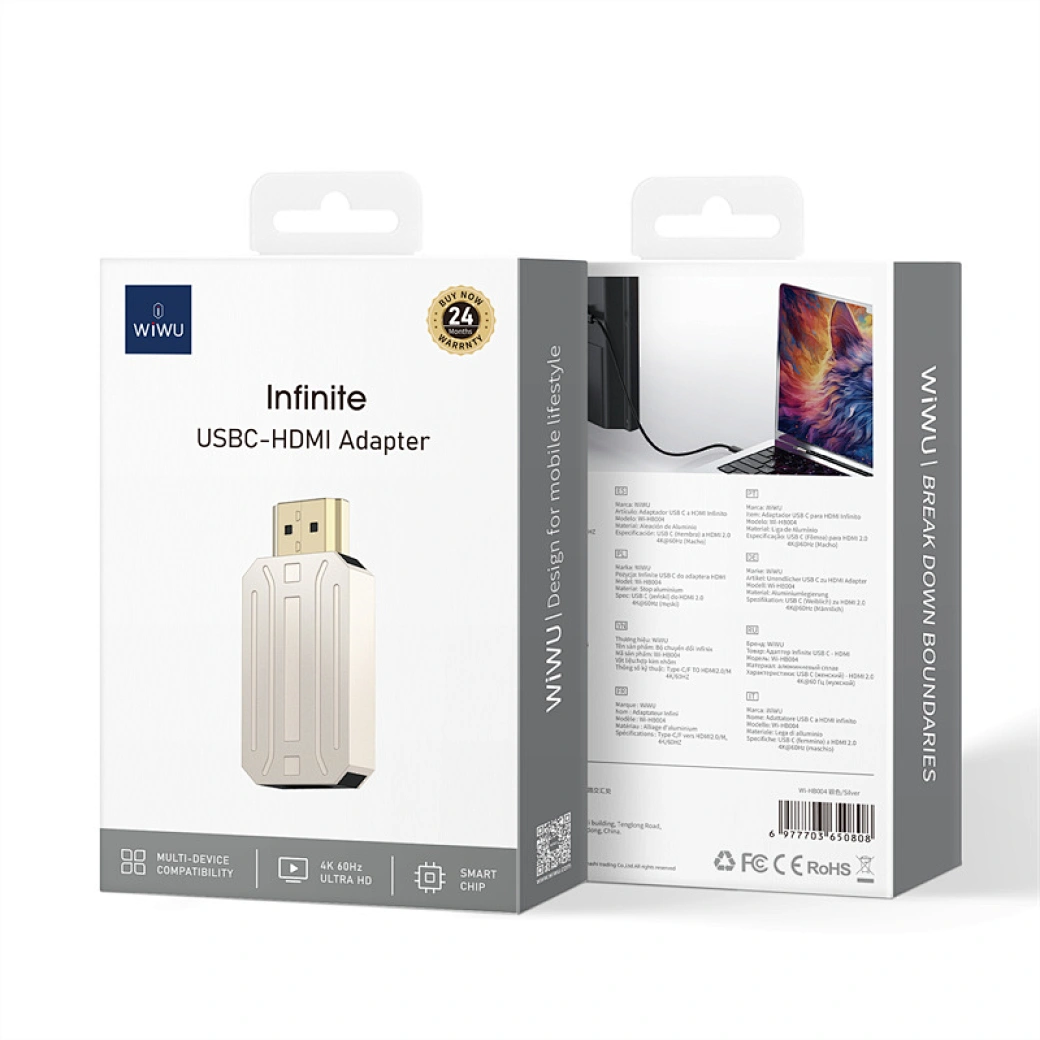
WiWU Infinite USB‑C to HDMI Adapter (HB004) – Sleek aluminum dongle offering 4K@60Hz output over USB‑C (DP Alt‑Mode), plug-and-play with no drivers needed.Compact, portable, and reliable—a must-have for mobile productivity, gaming, and media streaming. Model: WiWU Infinite USB‑C to HDMI Adapter (HB004) Video Output: HDMI 2.0, supports up to 4K @ 60 Hz resolution Material & Weight: Robust aluminum alloy body, compact, weighs ~69 g Compatibility: Plug-and-play connector works with USB‑C devices supporting DP Alt‑Mode—compatible with laptops, smartphones, tablets, consoles Design & Build: Slim, portable, durable—no driver/software required Use Cases: Ideal for mirroring/extending screens for presentations, streaming, gaming

Genuine-spec touchpad flex cable for MacBook Pro 13″ (Model A1502, Mid 2014)—restores full trackpad functionality, including precise cursor control and physical click response. Essential for repairing unresponsive or erratic trackpad behavior. Compatible With: MacBook Pro 13-inch (Mid 2014, Model A1502, Model Identifier MacBookPro11,1) with Intel Core i5/i7 processors and Retina display. Part Type: Touchpad flex cable only — does not include the trackpad housing, button mechanism, or mounting hardware. This is the ribbon cable that connects the trackpad to the logic board. Function: Transmits cursor movement and click signals (left/right physical clicks) Supports standard multi-touch gestures (two-finger scroll, tap-to-click, pinch-to-zoom) ⚠️ Note: This model uses a physical click mechanism—not Force Touch (no haptic feedback or pressure sensitivity). Transmits cursor movement and click signals (left/right physical clicks) Supports standard multi-touch gestures (two-finger scroll, tap-to-click, pinch-to-zoom) ⚠️ Note: This model uses a physical click mechanism—not Force Touch (no haptic feedback or pressure sensitivity). OEM-Quality Build: Matches Apple’s original in: Cable length and routing path Connector type and pin alignment Insulation and flexibility for long-term reliability Cable length and routing path Connector type and pin alignment Insulation and flexibility for long-term reliability Common Use Cases: Replacing a torn, frayed, or corroded original flex cable Fixing: Unresponsive or intermittent trackpad Cursor jumping or drifting Click function failure (left or right) Complete trackpad disconnect Replacing a torn, frayed, or corroded original flex cable Fixing: Unresponsive or intermittent trackpad Cursor jumping or drifting Click function failure (left or right) Complete trackpad disconnect Unresponsive or intermittent trackpad Cursor jumping or drifting Click function failure (left or right) Complete trackpad disconnect Installation Note: Requires bottom case removal and battery disconnect. Connects via a ZIF (Zero Insertion Force) socket on the logic board—do not force. Cable routes under the battery; handle with care to avoid strain. Suitable for intermediate to advanced DIYers or technicians. Requires bottom case removal and battery disconnect. Connects via a ZIF (Zero Insertion Force) socket on the logic board—do not force. Cable routes under the battery; handle with care to avoid strain. Suitable for intermediate to advanced DIYers or technicians.

Are you ready to take your gaming to the next level? Dive into the realm of ViewSonic VX2718-P-MHD gaming monitors, where affordability meets exceptional performance for an unmatched gaming experience. Firstly, enjoy crystal-clear visuals with ViewSonic’s high-resolution displays. Immerse yourself in the action with vibrant colors and sharp images, providing a gaming experience like never before. Transition smoothly between scenes with ViewSonic’s quick response times. Say goodbye to lag and motion blur, ensuring you stay ahead in the game and never miss a critical moment. Explore a range of sizes to suit your gaming setup. From compact options for cozy spaces to larger displays for a cinematic experience, ViewSonic has a gaming monitor to fit your preferences. Achieve optimal comfort with customizable settings. ViewSonic VX2718-P-MHD gaming monitors offer adjustable brightness, contrast, and color settings, allowing you to tailor the display to your liking and reduce eye strain during extended gaming sessions. In conclusion, elevate your gaming setup without breaking the bank. ViewSonic VX2718-P-MHD gaming monitors provide the perfect blend of affordability and top-notch performance, delivering a visually stunning and responsive gaming journey. Level up your gaming experience with ViewSonic today! Specifications: Resolution : FHD Display : 27″ Refresh Rate : 180Hz Response Time : 1ms 3 years warranty

The MSI G255PF E2 monitor delivers fast and responsive performance for competitive gaming. It features a 25-inch Full HD display that provides clear visuals and sharp detail. Therefore, players can enjoy smooth gameplay and accurate image quality. Moreover, the high refresh rate ensures fluid motion during fast-paced action. The rapid response time helps reduce motion blur and ghosting. As a result, gamers can react quickly and maintain control in intense situations. In addition, the Rapid IPS panel offers wide viewing angles and consistent color performance. This improves visibility from different positions. Furthermore, adaptive sync support helps eliminate screen tearing and stuttering for stable visuals. The monitor also includes multiple connectivity options for easy setup with gaming systems. Consequently, the MSI G255PF E2 monitor supports both performance and flexibility for modern gaming setups. MSI G255PF E2 monitor is a strong choice for gamers who need speed, clarity, and reliable performance. Specifications: 25-inch Full HD (1920 × 1080) Rapid IPS display High refresh rate for smooth gameplay Fast response time for reduced motion blur Adaptive sync support for tear-free visuals Multiple connectivity options for flexible setup

ACER KA220HQbid 21.5″ FHD, HDMI,AMD Freesync VESA 100x100mm Maximum Resolution 1920 x 1080 Colour Supported 16.7 Million Colours Brightness Aspect Ratio 16:9 Response Time 5 ms Backlight Technology LED Horizontal Viewing Angle 90° Vertical Viewing Angle 65° Tilt Angle -5° to 15° Features Flicker-free Features Low Dimming Features Blue Light Speakers No VGA Yes DVI Yes HDMI Yes Operating Power Consumption (Energy Star) 19.50 W Environmental Certification MPR II Package Contents KA220HQ Widescreen LCD Monitor Power Cord 1 x VGA Cable Specifications: ACER KA220HQbid 21.5″ FHD, HDMI,AMD Freesync VESA 100x100mm Maximum Resolution 1920 x 1080 Colour Supported 16.7 Million Colours Brightness 200 cd/m² Technical Information Aspect Ratio 16:9 Response Time 5 ms Backlight Technology LED Horizontal Viewing Angle 90° 1 Year Warranty

GAMDIAS 7 Colour Backlit Gaming USB Mechanical Keyboard with 87 Keys, Blue Switches, Anti-ghosting, Multimedia Control Key with Metal Plate, Combo (Multicolour, Hermes E2) About this item Certified mechanical blue switches feature a 50 Million actuation lifecycle Neon Light Spectrum- 7 colors backlight Elegant metal plate mechanical keyboard for added durability N-key rollover Compact 87 Keys Keyboard : By using small tenkeyless keyboard can save the space, and also makes the keyboard and mouse to become closer, so you can maximize the comfort and accuracy of your operation

Remax F21 Ruiyal Series – Oscillating water‑cooling fan with 4,000 mAh battery, digital display, and 6 wind levels.Portable and stylish small-table fan with 3 oscillation modes and mist spray cooling. Model: Remax F21 Ruiyal Series Water‑Cooling Oscillating Fan (White) Battery & Power: Built‑in 4,000 mAh battery; USB‑C rechargeable (details unspecified) Cooling Method: Water‑cooling spray system with turbine-style fan blades Wind Speed: 6 adjustable speed levels Oscillation: 3 movement modes—approx. 45°, 90°, or 120° Display & Controls: Digital display showing mode, speed, and battery indicators Dimensions & Weight: Compact tabletop size, ~868 g Power Consumption: Around 8W rated power

Compact, affordable all-in-one inkjet printer for home and small office use—print, scan, and copy in color with easy wireless setup, mobile printing, and HP’s efficient ink system.

Genuine Apple sleep/wake sensor flex cable (Hall effect sensor) for MacBook Air 13.6″ (Model A2681, 2022, M2)—ensures automatic display sleep when the lid is closed and wake-on-open functionality. OEM part number 821-04129-02. Compatible With: MacBook Air 13.6-inch (2022, Model A2681) with Apple M2 chip (all colors: Silver, Space Gray, Starlight, Midnight). Apple Part Number: 821-04129-02 (exact OEM service part). Function: Contains the Hall effect sensor that detects the magnet in the MacBook Air’s display lid. This allows macOS to: Sleep the system when the lid is closed Wake instantly when opened Prevent false sleep/wake events during use Sleep the system when the lid is closed Wake instantly when opened Prevent false sleep/wake events during use Location: Mounted near the right side of the keyboard, adjacent to the battery and logic board. Common Failure Symptoms: MacBook doesn’t sleep when lid is closed MacBook wakes randomly in a bag “Lid closed” not recognized in macOS Requires manual sleep or power button use MacBook doesn’t sleep when lid is closed MacBook wakes randomly in a bag “Lid closed” not recognized in macOS Requires manual sleep or power button use Part Type: Flex cable with integrated Hall sensor—not just a cable, but a calibrated magnetic sensor module. Installation Note: Requires full bottom case removal and careful disconnection of the battery. The sensor is adhered near the I/O area—do not bend or puncture. Recommended for experienced technicians.

Apple Magic Keyboard - A1644 Wireless Bluetooth - UK English Layout Apple Magic Keyboard – A1644 Wireless Bluetooth – UK English Layout

The Samsung 86″ Interactive E-Board LH86WACW offers a large and clear display for classrooms and meeting rooms. It shows bright images with strong detail. The screen size allows everyone in the room to see clearly. This improves communication and teamwork. Moreover, the Samsung Interactive E-Board LH86WACW supports smooth touch control. You can write, draw, and move items with ease. The touch response feels fast and natural. This helps teachers and teams present ideas more effectively. In addition, the board includes multiple connection options. You can connect laptops, tablets, and other devices quickly. This makes sharing content easier for everyone. The board also supports wireless features for more flexible use. Furthermore, the Samsung 86″ Interactive E-Board LH86WACW includes built-in software tools. These tools allow easy note-taking and smart collaboration. You can save your work and share it instantly. This helps improve learning and workflow. Also, the display uses strong protection glass. It resists scratches and damage during daily use. The durable design makes it ideal for schools and offices. It stays reliable even with heavy use. The sleek design of the Samsung Interactive E-Board LH86WACW looks modern and professional. It fits well in classrooms, conference rooms, and training centers. The slim frame gives the screen a clean and elegant look. This makes every space feel more advanced. Overall, the Samsung 86″ Interactive E-Board LH86WACW offers clear visuals, fast touch control, and smart tools in one device. It helps teams share ideas better and faster. It also makes lessons more interactive and engaging. This board is perfect for education, business, and training environments. Specifications: Display : 86″ IPS Resolution : 3840×2160 Refresh Rate : 60Hz Response Time : 8ms Model : LH86WACW

The Samsung 83-Inch OLED S85F 4K Vision AI Smart TV | QA83S85FAEXTW delivers a premium home cinema experience with a massive OLED display. It uses OLED technology that produces deep blacks, strong contrast, and rich colors. As a result, movies, sports, and games look more realistic and immersive on the large 83-inch screen. Samsung Vision AI enhances picture and sound in real time. It analyzes each scene and automatically adjusts brightness, color, and sharpness. Therefore, the viewing experience stays balanced and clear without manual tuning. In addition, AI upscaling improves lower-resolution content and upgrades it closer to 4K quality for better detail and clarity. The OLED panel uses self-lit pixels, so every part of the image is controlled individually. This improves detail in dark scenes while keeping bright areas accurate and vivid. HDR further expands contrast and color range, making visuals more lifelike. Fast motion also appears smoother, which improves sports and action viewing. Samsung’s Smart TV system provides easy access to streaming apps, gaming features, and smart home controls. It runs smoothly and responds quickly when switching between apps. In addition, the ultra-slim design with thin bezels gives the TV a modern and premium appearance that fits large living rooms and entertainment spaces. Overall, this Samsung OLED TV combines large-screen immersion, AI-powered optimization, and smart connectivity. It is designed for users who want a high-end cinematic viewing experience at home. Specifications: OLED technology delivers deep blacks and rich color accuracy 83-inch 4K display provides immersive large-screen viewing Vision AI optimizes picture and sound automatically in real time HDR enhances contrast, brightness, and color depth Smart TV platform supports streaming apps and smart features

Led Curved Gaming Monitor Display Screen Size (Inch):23.5 Screen Size (cm):59.8 Screen Size (Class):24 Flat / Curved : Curved Active Display Size (HxV) (mm) :521.3952(H) * 293.2848(V) Screen Curvature : 1800R Aspect Ratio : 16:9 Panel Type : VA Brightness (Typical) : 250cd/m2 Peak Brightness (Typical) : 250cd/m2 cd/㎡ Brightness (Min) : 200cd/m2 Contrast Ratio Static : 3,000:1(Typ) Dynamic Contrast Ratio : Mega DCR Resolution : 1,920 x 1,080 Response Time : 4ms (GTG) Viewing Angle (H/V) : 178°(H)/178°(V) Color Supported : 16.7M Color Gamut (NTSC 1976) : 72% Refresh Rate : 144Hz Specifications: Led Curved Gaming Monitor Display Screen Size (Inch):23.5 Screen Size (cm):59.8 Screen Size (Class):24 Flat / Curved : Curved 3 year warranty

Genuine-spec touchpad flex cable for MacBook Pro 13″ (Model A2338, 2020, Apple M1)—essential for restoring full Force Touch functionality, haptic feedback, and precise multi-touch gesture control during trackpad repair or replacement. Compatible With: MacBook Pro 13-inch (2020, Model A2338, Model Identifier MacBookPro17,1) with Apple M1 chip (2 Thunderbolt ports). Part Type: Touchpad flex cable only — does not include the trackpad housing, Taptic Engine, or mounting hardware. This is the OEM-style ribbon cable that connects the trackpad to the logic board. Function: Transmits: Touch input coordinates Force Touch pressure data Haptic feedback signals to the Taptic Engine Enables full macOS gesture support: Force Click, three-finger lookup, swipe navigation, pinch-to-zoom, and smooth cursor tracking. Touch input coordinates Force Touch pressure data Haptic feedback signals to the Taptic Engine Enables full macOS gesture support: Force Click, three-finger lookup, swipe navigation, pinch-to-zoom, and smooth cursor tracking. OEM-Quality Build: Matches Apple’s original specifications in: Cable length and routing Connector pitch and ZIF latch design EMI shielding and flex durability Cable length and routing Connector pitch and ZIF latch design EMI shielding and flex durability Common Use Cases: Replacing a torn, creased, or liquid-damaged original flex cable Completing a trackpad replacement when the original cable is compromised Fixing intermittent trackpad behavior, loss of Force Touch, or complete unresponsiveness Replacing a torn, creased, or liquid-damaged original flex cable Completing a trackpad replacement when the original cable is compromised Fixing intermittent trackpad behavior, loss of Force Touch, or complete unresponsiveness Installation Note: Requires full bottom case removal and battery disconnection. Cable routes under internal components near the right speaker and logic board. Connects via a ZIF (Zero Insertion Force) socket—must be aligned carefully and latched gently. Recommended for experienced or certified technicians only. Requires full bottom case removal and battery disconnection. Cable routes under internal components near the right speaker and logic board. Connects via a ZIF (Zero Insertion Force) socket—must be aligned carefully and latched gently. Recommended for experienced or certified technicians only. Important Compatibility Notes: ✅ Only for A2338 (13″, M1, 2020) ❌ Not compatible with: Intel-based A2251 / A2289 (2020) MacBook Air M1 (A2337) Any MacBook Air or 14″/16″ MacBook Pro ✅ Only for A2338 (13″, M1, 2020) ❌ Not compatible with: Intel-based A2251 / A2289 (2020) MacBook Air M1 (A2337) Any MacBook Air or 14″/16″ MacBook Pro Intel-based A2251 / A2289 (2020) MacBook Air M1 (A2337) Any MacBook Air or 14″/16″ MacBook Pro
